
Dataform to Blindata catalog
How Dataform repositories, actions and the BigQuery tables they build appear in the Blindata catalog
This page explains where each Dataform and BigQuery object lands in the Blindata catalog, so you know what to look for after a run.
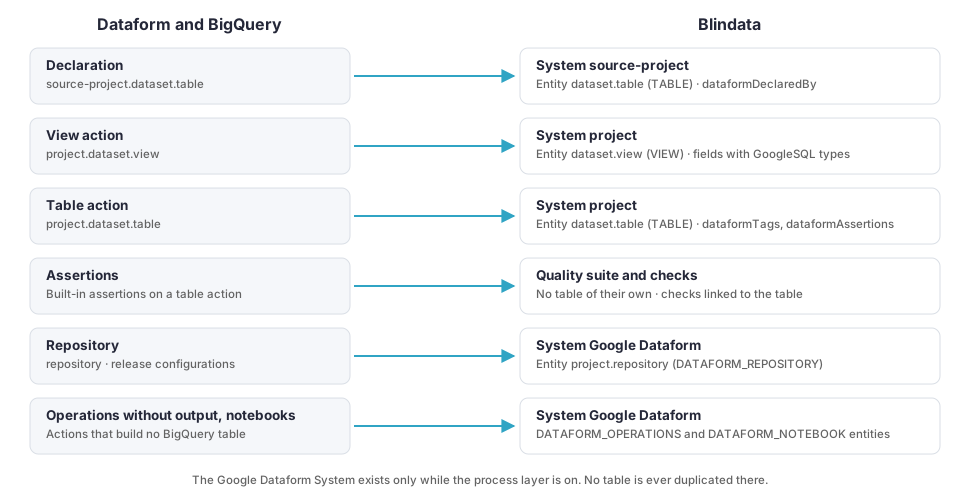
The rule of thumb:
- A BigQuery table or view that a Dataform action builds, reads or declares becomes one physical entity on the System of its BigQuery project, in the schema named after its dataset. Its columns become physical fields. This is the same entity a BigQuery crawl, Power BI or query-history lineage uses, so Dataform enriches it instead of duplicating it.
- What has no table of its own (a repository, an operation that builds nothing, a notebook) becomes a physical entity in a single Google Dataform System. You can switch this layer off.
- Data moving between tables becomes data flows. See Data lineage .
- Assertions become quality checks. See Assertions as quality checks .
Systems
One System per BigQuery project
Every BigQuery project that the pipelines read or write gets a System, including source projects such as bigquery-public-data that you did not list in the job.
| Attribute | Value |
|---|---|
| Name | The pinned name, or the one built by projectSystemNamePattern (default: the project id) |
| Subtype | DATABASE |
| Technology | Google BigQuery |
| Property | bigQueryProjectId: the project id |
The job looks for the System of a project in this order, and creates one only when none is found:
- The System you pinned in
systems.projectSystems. - A System that already carries
bigQueryProjectIdwith that project id. - A System named as
projectSystemNamePatternsays.
When it reuses a System that has no bigQueryProjectId, it adds the property and nothing else: it never renames a System and never changes its description, technology or other properties. A System that carries a different project id is left as it is. If two Systems carry the same project id, the first by name is used and the run reports AMBIGUOUS_PROJECT_SYSTEM.
The Google Dataform System
| Attribute | Value |
|---|---|
| Name | Google Dataform, or systems.dataformSystem
|
| Subtype | SERVICE |
| Technology | Google Dataform |
It exists only while capabilities.processLayer
is on. It holds the objects below that are not tables. A table is never duplicated here.
Physical entities
On the BigQuery project System
| Dataform object | Schema | Name | Type |
|---|---|---|---|
| Table, incremental table | Dataset | Table name | The BigQuery type (TABLE, …), else TABLE |
| View, materialized view | Dataset | View name | The BigQuery type, else VIEW or MATERIALIZED_VIEW |
| Operations with an output table | Dataset | Table name | The BigQuery type |
| Data preparation destination | Dataset | Table name | The BigQuery type, else TABLE |
| Declaration (a source table) | Dataset | Table name | The BigQuery type |
Assertion view, only with assertionViews |
Assertion dataset | View name | VIEW |
Names keep the case BigQuery uses. The type written for an entity that already exists is never replaced by a default: when the job cannot read the BigQuery type, the stored type is kept.
A wildcard declaration such as events_* is one entity with that name and the property dataformWildcard. Its fields come from the newest shard whose suffix is all digits (dataformWildcardSampleShard names it). If the dataset has more tables than limits.maxTablesListedPerDataset, or no such shard, the entity has no fields and the run reports WILDCARD_SCHEMA_UNAVAILABLE.
A declaration is written only if its metadata could be read or if it is not in Blindata yet. So a declaration of a table you already crawl never degrades it.
On the Google Dataform System
| Dataform object | Schema | Name | Type |
|---|---|---|---|
| Repository (every repository read, even with no environment) | Project id | Repository id | DATAFORM_REPOSITORY |
| Operations without output, and operations that create a routine | <projectId>.<repositoryId> |
Dataform schema.name of the action |
DATAFORM_OPERATIONS |
| Notebook | <projectId>.<repositoryId> |
Dataform schema.name of the action |
DATAFORM_NOTEBOOK |
BigQuery unit tests are counted in the run report only.
Physical fields
| Source | Blindata field |
|---|---|
| Top-level column of a BigQuery table | Name, GoogleSQL type such as STRING or TIMESTAMP, position (starting at 1), and description |
| Column documented in the Dataform action | The description of the matching field. Matched by name, ignoring case. |
Nested column documented in Dataform, customer.email |
One line `customer.email`: <description> added to the description of the parent field customer |
| Column with policy tags | The property bigqueryPolicyTags on the field |
Only top-level columns are fields. The fields of a STRUCT or RECORD are not.
When BigQuery metadata is off or cannot be read, the job writes the descriptions of fields that already exist. It creates the documented columns without type or position only on tables it created in the same run, and never on a table another job cataloged. Column lineage is skipped for tables whose columns are not known with their position (COLUMNS_UNAVAILABLE).
Routines. An operation that creates a procedure or function (CREATE [OR REPLACE] PROCEDURE | FUNCTION) becomes a system routine on the BigQuery project System, with the name, definition and description Dataform and BigQuery give it. It is added only when the routine is not already in Blindata, so it never overwrites a routine a JDBC crawl cataloged. The routine is not a table and is not analyzed for lineage. TEMP routines are counted only.
Properties
Each entity carries additional properties that tie it back to Dataform. Only non-empty properties are written.
On tables and views
| Property | Meaning |
|---|---|
dataformRelationType |
TABLE, INCREMENTAL_TABLE, VIEW, MATERIALIZED_VIEW, OPERATIONS, DATA_PREPARATION, DECLARATION, ASSERTION |
dataformRepository |
Resource name of the repository that builds the table |
dataformActionId |
Stable identity of the action: dataform:<project>/<location>/<repository>:<database>.<schema>.<name>. It is the process of the data flows. |
dataformFilePath |
Path of the file that defines the action in the repository |
dataformTags |
The action’s tags, sorted |
dataformEnvironments |
The environments of that repository that build this table |
dataformGitCommit, dataformCoreVersion |
The commit and Dataform core version of the compilation |
dataformDisabled |
true for a disabled action |
dataformUniqueKey, dataformProtected |
Incremental tables: the unique key columns, and true when a full refresh is disabled |
dataformPartitionBy, dataformClusterBy |
Partition expression and cluster columns |
dataformTableFormat, dataformStorageUri |
For Iceberg tables |
dataformLoadMode |
For data preparations |
dataformAssertions |
The assertions on the table, as <kind>:<assertion name> separated by ; |
dataformDeclaredBy |
For declarations, the repositories that declare the table |
bigqueryLabels |
BigQuery labels as key=value, sorted |
dataformRepositoryUrl |
Link to the repository in the Google Cloud console |
dataformLastRunState, dataformLastRunTime, dataformLastRunFailure, dataformLastBigQueryJobId |
The last run of the action. Only with runMetadata
. |
On repositories and process entities
| Property | Meaning |
|---|---|
dataformRepository, dataformDisplayName, dataformLocation |
The repository, its display name and its location |
dataformGitUrl, dataformDefaultBranch |
The Git remote and its default branch |
dataformRepositoryKind |
A Dataform repository, or a BigQuery pipeline |
dataformReleaseConfigs |
One line per release configuration: its id, the Git reference, the schedule, disabled, and the overrides (default database, schema, location, suffixes, prefix) |
dataformWorkflowConfigs |
One line per workflow configuration: its id, the release configuration, the schedule and what it selects (targets, tags, dependencies) |
dataformLastCompiledCommit, dataformCoreVersion |
The commit and Dataform core version of the last compilation read |
dataformFilePath, dataformTags, dataformDisabled, dataformEnvironments |
On operations and notebooks, as on tables |
dataformQueryCount |
On operations: the number of SQL queries |
dataformDependencies |
On notebooks: the actions they depend on |
The connector sets no tags and creates no tasks or logical entities.
Example
Take a Dataform repository ecommerce-demo in the project acme-analytics, built on the BigQuery public dataset bigquery-public-data.thelook_ecommerce. It declares four e-commerce tables and builds four staging views and two reporting tables, with three built-in assertions. Deployed with a production release configuration, it produces:
| Dataform action | System | Schema | Entity | Type | Key properties |
|---|---|---|---|---|---|
Declaration bigquery-public-data.thelook_ecommerce.users |
bigquery-public-data |
thelook_ecommerce |
users |
TABLE |
dataformDeclaredBy with the repository |
View staging.stg_customers |
acme-analytics |
staging |
stg_customers |
VIEW |
dataformRelationType = VIEW, dataformTags = staging, the description from the .sqlx file |
Table reporting.customer_orders, with unique key and row conditions assertions |
acme-analytics |
reporting |
customer_orders |
TABLE |
dataformTags = daily, dataformAssertions with both assertions |
Assertions on customer_orders |
none | none | none | none | Two quality checks in the suite of the production environment, linked to customer_orders |
| Repository | Google Dataform |
acme-analytics |
ecommerce-demo |
DATAFORM_REPOSITORY |
The Git remote, the release configuration and the schedules |
Three Systems appear (bigquery-public-data, acme-analytics and Google Dataform), and no table exists twice.
Living with a BigQuery crawl
If you already crawl BigQuery, run the two jobs in any order. The Dataform job follows these rules, so it never makes a crawled entity worse:
- It uses the Systems your crawl created (see how a System is found ).
- It never blanks a type or a position that is stored. If it cannot read a value, it writes the stored one back.
- It adds its own properties by name and leaves the others as they are.
- It writes descriptions documented in Dataform. When Dataform has no description for an object, the stored description is kept.
- It never removes an entity, a field or a routine of a BigQuery System.
- It adds a BigQuery routine only when your crawl has not already cataloged it.
Re-runs and changes
You can run the job again as often as you like. Each run updates what is already in Blindata instead of adding a second copy.
| What changes in Dataform or BigQuery | What happens in Blindata |
|---|---|
| A table, a column or a description changes | The entity or field is updated in place, with no duplicates. Data flows are updated in the same way. |
| An action or a table is renamed | The new name is a new entity. The old one stays until you remove it: the job never deletes entities of a BigQuery System. |
| An action is deleted | Its entity stays in Blindata. Process entities in the Google Dataform System are removed only by the optional cleanup . |
| An action is disabled | It stays in the catalog with dataformDisabled = true, and its lineage is no longer published (ACTION_DISABLED). |
| The same table is built by several environments | One entity, whose dataformEnvironments lists them. One flow lists the environments it appears in. |
| The same table is built by two repositories | One entity: the last repository wins (repositories are taken in the order of their resource names), and the table is listed in targetCollisions in the run report. |
| The service account cannot read a table | The entity is still published, with the values already stored, and the run reports METADATA_UNAVAILABLE. |
| A compilation has errors | The actions it contains are read, but nothing is cleaned up for that environment, and its stale statements are not removed, until a run reads it without errors. |
A System’s description and technology are written only when the System is created. Edit them in Blindata afterwards and later runs keep your changes.
Note
Cleanup runs only after a complete run, so a partial run never removes content by mistake. The conditions are listed under cleanupOptions
.