
Data lineage reconstruction
The data lineage the Google Dataform connector publishes, at table and column level, and how to read it and troubleshoot it in Blindata
The connector publishes lineage as data flows between the tables in your Blindata catalog: from a source table or column to the one a Dataform action builds from it. Each flow names the Dataform action that moved the data, so you can see not only where data comes from but which pipeline step produces it.
Lineage comes from two sources that work together:
- Table level comes from the dependency graph of the deployed Dataform compilation. It is published for every action that reads a table, whatever its SQL looks like.
- Column level comes from Blindata’s SQL lineage. The connector reconstructs the SQL that Dataform runs and sends it to a query bucket, where Blindata’s parser finds which source column feeds which target column.
Because both land on the same table entities, the flows join the lineage that other jobs publish: a BigQuery crawl, Power BI, or query history.
The example below uses the repository ecommerce-demo described in Dataform to Blindata catalog
, built on the BigQuery public dataset bigquery-public-data.thelook_ecommerce. The view stg_customers reads the declared table users; the connector publishes the table flow, and the SQL of the view gives the column flows.
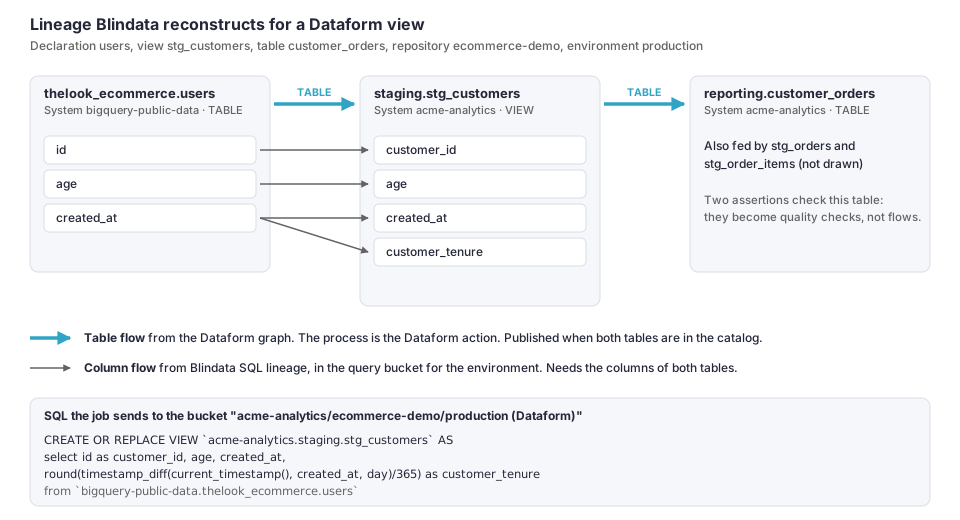
What a data flow tells you
Open a data flow published by the connector to see:
| Field | What it tells you | Example |
|---|---|---|
| From / To | The source and target table | thelook_ecommerce.users → staging.stg_customers |
| Process | The Dataform action that builds the target, by its stable identity dataformActionId |
dataform:acme-analytics/us/ecommerce-demo:acme-analytics.staging.stg_customers |
| Evidence | How precise the flow is. Flows from the Dataform graph are TABLE. |
evidence=TABLE |
| Origin | Where the flow comes from | dataform graph |
| Environments | The release configurations in which the flow was seen | production |
| Statement | What SQL lineage made of the action’s SQL: see Statement results | COLUMN_LINEAGE |
| Gap | Why some detail is missing, if any: see Why is my lineage missing? | gap=QLP_ANALYSIS_ERROR |
Descriptions contain object names only. The SQL is never copied into a flow.
The column flows are created by Blindata’s SQL lineage from the statements in the environment’s bucket, so they are listed in the query parser section of Blindata, under the bucket, as well as on the data flows page.
Table lineage from the Dataform graph
For every enabled action, the connector looks at each dependency in the compiled graph and keeps it as a flow only when it is a data dependency: the dependency is a table the action’s SQL actually reads.
| Dependency in the graph | What the connector does | Counted as |
|---|---|---|
| A table the action’s SQL reads | A TABLE flow, with the action as process |
none |
A dependency declared only to order execution (dependencies: [...] with no read) |
Not a flow | ORDERING_ONLY_DEPENDENCY |
| An assertion | Not a flow | ASSERTION_DEPENDENCY |
| A dependency of an operation that builds no table | Not a flow: there is no table to link to | OPERATIONS_DEPENDENCY |
| An operation that created a BigQuery routine | Not a flow: a routine is not a data source | ROUTINE_DEPENDENCY |
| A dependency that is not an action of the same compilation | Not a flow | UNMAPPED_EXTERNAL_ENDPOINT |
| Any dependency of a disabled action | Not a flow | ACTION_DISABLED |
| Any dependency of a notebook | Not a flow | NOTEBOOK_CODE_NOT_ANALYZED |
A flow is published only when both tables are in the Blindata catalog. The connector catalogs the tables first, in the same run, so this holds unless a table could not be catalogued (TARGET_NOT_CATALOGUED).
The same dependency found in several environments of a repository is one flow that lists the environments.
Column lineage from SQL
With capabilities.columnLineage
on (the default), the connector sends the SQL that Dataform executes to a query bucket. It does not read the SQL scripts that Dataform ran: it rebuilds the statement from the compiled action. An incremental table gets two statements, one for each of its queries, both written as CREATE OR REPLACE TABLE so that the parser links columns by name. A filter on the table itself in the incremental query, such as WHERE ts > (SELECT MAX(ts) FROM self), adds no flow.
| Dataform action | What is sent for column analysis |
|---|---|
| Table, incremental table | CREATE OR REPLACE TABLE `project.dataset.table` AS followed by the action’s query |
| Incremental table: incremental query | The same, followed by the incremental query, named <project>.<dataset>.<table>#incremental. Not sent when it is the same as the full-refresh query. |
| View | CREATE OR REPLACE VIEW `project.dataset.view` AS followed by the query |
| Materialized view | CREATE OR REPLACE MATERIALIZED VIEW ... followed by the query |
Operations: plain SQL queries (INSERT, MERGE, UPDATE, CREATE TABLE AS …) |
Each query as written, named <project>.<schema>.<name>#<n> (n starts at 0) |
| Operations: scripted queries | A routine of the Google Dataform System: see Scripted operations |
| Operations that create a procedure or function | Nothing: it is cataloged as a BigQuery routine |
| Data preparation written in SQL (pipe syntax) | CREATE OR REPLACE TABLE `project.dataset.table` AS followed by the preparation’s SQL, whatever its load mode |
| Data preparation in YAML | Nothing: table flows only |
| Pre and post operations, assertions, notebooks | Nothing |
A statement is sent only if the columns of the table it builds and of every table it reads are in the catalog with their position: the parser needs them to resolve SELECT * and to link columns. Otherwise the action keeps its table flows and reports COLUMNS_UNAVAILABLE. This is why BigQuery metadata
matters for column lineage.
Query buckets
The connector creates one query bucket for each environment (one release configuration of one repository), named by queryBucketPattern
, by default <projectId>/<repository>/<environment> (Dataform). For example: acme-analytics/ecommerce-demo/production (Dataform).
A bucket is configured by the job:
- its Systems are the BigQuery project System of the repository and every other project System that the environment’s tables belong to, so the parser can resolve
dataset.tableacross projects; - its data flow level is field, so flows are created from column to column, without FDR flows;
- it analyzes no routines of its own: scripted operations are analyzed by the job explicitly, into the bucket of their environment;
- it has pre-processing rules for BigQuery syntax.
Leave the Dataform buckets as they are. You do not create them, and the job rewrites their rules on its next run if they differ. The rules are the Google BigQuery preset of the bucket editor, 32 rules in a form that gives the same result in whatever order Blindata applies them. See BigQuery query pre-processing for what they cover.
| Group | What the rules do |
|---|---|
| Comments and blank lines | Remove comments outside quoted text, the blank lines they leave, and a trailing comma before FROM |
| Names | Turn backticked names (`project.dataset.table`) into quoted names; remove a hyphenated project id from unquoted names |
MERGE and DELETE |
Accept MERGE without INTO, BY TARGET / BY SOURCE clauses and DELETE without FROM |
| Expressions, literals, table DDL | Handle named arguments, INTERVAL and BIGNUMERIC literals, UNNEST … WITH OFFSET, complex column types, OPTIONS, PARTITION BY expressions and similar forms |
| Statements with a different shape | Read CLONE, CREATE TABLE FUNCTION, EXPORT DATA, CREATE MODEL and ASSERT through the query they contain |
| Statements without lineage | End as IGNORED: ALTER, CALL, CREATE FUNCTION, LOAD DATA and similar |
You can see the effect on any statement of the bucket: its Pre-processed tab compares the stored query with the text the parser receives.
The parser reads the schema and the name of a table, not its project. When two of a bucket’s project Systems hold a table with the same dataset and name, the connector does not send the statements that touch it, to avoid linking the wrong one (AMBIGUOUS_TABLE_NAME).
Statement results
For each statement, Blindata answers with a status that the connector reports as a verdict. The worst verdict of an action decides the gap on its table flows.
| Verdict | What happened | Gap on the table flow |
|---|---|---|
COLUMN_LINEAGE |
The parser found the column flows. | none |
ROUTINE_COLUMN_LINEAGE |
Same, for a script analyzed as a routine. | none |
ROUTINE_PENDING |
A script was analyzed in this run. Its statements are inserted a moment later. | none |
PARTIAL |
The parser could analyze only part of the statement. | SOURCE_NOT_CATALOGUED |
NO_LINEAGE |
The parser found nothing to link. | QUERY_NOT_ANALYZED |
FAILED |
The parser reported an error on the SQL. | QLP_ANALYSIS_ERROR |
NOT_POSTED |
The connector did not send the statement. | COLUMNS_UNAVAILABLE, AMBIGUOUS_TABLE_NAME or SCRIPT_NOT_ANALYZED |
NO_STATEMENT |
The action has no SQL to send, or its script gave no statement. | QUERY_NOT_ANALYZED or SCRIPT_NOT_ANALYZED |
PLANNED |
Dry run: the statement would be sent. | none |
The verdicts are counted in the run report (queryStatements.byVerdict, and per environment), and the reasons for NOT_POSTED in queryStatements.notPostedByGap.
Scripted operations
BigQuery scripting (DECLARE, SET, BEGIN … END, IF, loops, CALL, EXECUTE IMMEDIATE) is not something the parser reads as a statement. When the first keyword of an operations query is one of these, the connector sends it as a system routine of the Google Dataform System, and asks Blindata to analyze the routine into the environment’s bucket. The statements the analysis finds become flows like any other.
- The routine is named
<schema>.<name>#<n>@<environment>and lives in the schema of the target dataset, with the catalog<projectId>.<repositoryId>. It is typedSCRIPTand holds the query as its definition. - The result shows one run late. Blindata inserts the statements of a routine a moment after the analysis, and the connector reports the outcome on its next run. The first run shows
ROUTINE_PENDING. Later runs showROUTINE_COLUMN_LINEAGE, or the reason it failed. - A script that has not changed is not analyzed again. A script that moves to another bucket is reset and analyzed again.
- A script the analysis cannot extract anything from gives
NO_STATEMENTand the gapSCRIPT_NOT_ANALYZED. A script withEXECUTE IMMEDIATEalso countsDYNAMIC_CODE: the SQL inside the string is never analyzed. - Scripts need the Google Dataform System and column lineage. With
processLayerorcolumnLineageoff, scripted operations are not analyzed (SCRIPT_NOT_ANALYZED). - When a script disappears from Dataform, the connector removes its routine and, with it, its statements and flows.
Keeping lineage up to date
- Each run republishes the lineage it finds, so flows follow your pipelines as they change. A statement whose text and result did not change is left alone.
- For each environment that the run read completely, the connector removes the statements of its bucket that the run no longer produces, and with them the flows they created. So a view you delete or rewrite does not leave stale column flows behind.
- An environment that could not be read completely (a compilation with errors, a graph that failed to load, a table without metadata) is not reconciled: its statements stay as they were until a run reads it completely.
- Statements that were not sent only because the columns of a table are not known yet are kept, so lineage does not disappear while a permission is fixed.
- Table flows that no longer exist stay in Blindata until a cleanup
with
dataFlowsDeletionEnabledremoves the flows of yourdataFlowScopethat were not updated for the number of days you choose. - A disabled action keeps its entity and publishes no new flows.
Why is my lineage missing?
The run report lists every gap, with a count per reason and per environment (gapsByReason). The reasons below can appear in this release. Start with the reason, then open the data flow or the query bucket.
Table flows missing
| Reason | What it means | What to do |
|---|---|---|
TARGET_NOT_CATALOGUED |
One end of the flow is not in the Blindata catalog, so the flow cannot be anchored. | Check that the table was cataloged in this run (see METADATA_UNAVAILABLE), and that its project has a System. |
UNMAPPED_EXTERNAL_ENDPOINT |
The action depends on something that is not an action of the same compilation (for example a table written outside Dataform). | Usually nothing: the dependency points outside the compilation, and no flow is published for it. |
ORDERING_ONLY_DEPENDENCY |
The dependency only orders execution: the SQL does not read the table. | Expected. If the SQL does read it with a name Dataform did not resolve, use ref() so the graph shows the read. |
ASSERTION_DEPENDENCY |
The dependency is an assertion. | Expected. Assertions become quality checks instead. |
OPERATIONS_DEPENDENCY |
The action is an operation that builds no table. | Expected. Give the operation an output table if you want a table flow. Its SQL can still give column flows. |
ROUTINE_DEPENDENCY |
The action depends on an operation that creates a routine. | Expected: a routine is not a data source. |
ACTION_DISABLED |
The action is disabled in Dataform. | Expected. Enable it in Dataform if it should run. |
NOTEBOOK_CODE_NOT_ANALYZED |
The action is a notebook, whose code is not analyzed. | Expected. |
Column flows missing
| Reason | What it means | What to do |
|---|---|---|
COLUMNS_UNAVAILABLE |
The columns, with their position, of the target or of a source table are not in the catalog, so the statement was not sent. It also appears when the project of the repository has no System. | Grant roles/bigquery.metadataViewer
on the datasets, turn on bigQueryMetadata, or crawl the source. |
AMBIGUOUS_TABLE_NAME |
Two of the bucket’s project Systems hold a table with the same dataset and name, so the parser cannot tell them apart. | The table flow is still published. Column lineage for this action is not available until the names differ. |
SOURCE_NOT_CATALOGUED |
The parser could analyze only part of the SQL: a table it reads is not in the bucket’s Systems, or its columns are not known. | Check that the source project has a System, and that its tables and columns are cataloged. Open the statement to see which. |
QUERY_NOT_ANALYZED |
The parser found nothing to link, or the action has no SQL. | Open the statement in the bucket to see its status. |
QLP_ANALYSIS_ERROR |
The parser reported an error on the SQL, usually a BigQuery construct it does not support. | Open the statement in the bucket to read the error. The table flow is still published. |
SCRIPT_NOT_ANALYZED |
A scripted operation could not be analyzed: the process layer or column lineage is off, or the analysis found no statement in it. | Turn on processLayer and columnLineage. Otherwise expected for scripts whose SQL is built as text. |
DYNAMIC_CODE |
The script runs SQL built as text (EXECUTE IMMEDIATE). That SQL is never analyzed. |
Expected. |
Whole repositories or environments missing
| Reason | What it means | What to do |
|---|---|---|
ACCESS_DENIED |
Google refused a project or location. The report says the Google reason. | See Check your setup . |
RESOURCE_UNAVAILABLE |
The project or location does not exist, or has no repositories there. | Check projects and locations. |
NO_COMPILATION_RESULT |
The repository, or one of its release configurations, has no deployed compilation yet. | Trigger the release configuration in Dataform. The repository is cataloged without actions until then. |
COMPILATION_ERRORS |
The deployed compilation has errors. Its actions are read, but nothing is reconciled or cleaned up for this environment. | Fix the errors in Dataform and release again. |
RUN_BUDGET_EXHAUSTED |
More runs exist than maxInvocationsPerRepository allows, so older ones were not read. |
Raise the limit if you need the older runs. |
METADATA_UNAVAILABLE |
The service account cannot read the BigQuery metadata of some tables. | Grant the BigQuery metadata role. Stored values are kept in the meantime. |
Other reasons describe the catalog and quality, not lineage: AMBIGUOUS_PROJECT_SYSTEM and WILDCARD_SCHEMA_UNAVAILABLE (see Dataform to Blindata catalog
), and QUALITY_PERMISSION_MISSING and CHECK_CODE_CONFLICT (see Assertions as quality checks
).
If a table flow exists but you expected column flows, open the bucket of the environment in the query parser section of Blindata, find the statement named after the target table, and read its status. A statement the parser did not understand is listed there with the error.