
Google Dataform
Catalog Dataform repositories and the BigQuery tables they build, with table and column lineage from the Dataform graph and its SQL, and assertions as quality checks.
Capabilities
| Capability | Support | Notes |
|---|---|---|
| Tables, views & columns | Supported | Repositories, release and workflow configurations, and the tables, views and declarations of each deployed compilation, added to the BigQuery project Systems you may already crawl. |
| Keys, constraints & indexes | Not available | |
| Procedures & functions | Partial | BigQuery procedures and functions created by Dataform operations, added only when they are not cataloged yet. |
| Data lineage | Supported | Table flows from the Dataform dependency graph, column flows from Blindata SQL lineage on the SQL that Dataform runs, across repositories and projects. |
| Lineage from query history | Not available | |
| Business glossary links | Not available | |
| Data quality probes | Partial | Dataform assertions are imported as quality checks with pass or fail results from Dataform runs. The connector does not run probes. |
| Data profiling | Not available | |
| Data classification | Not available | |
| Chat with your data | Not available |
Overview
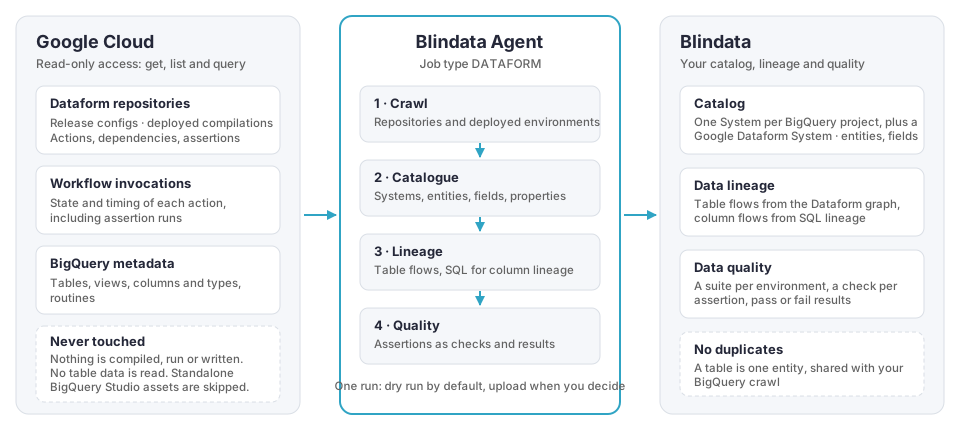
The Google Dataform connector reads the pipelines your teams deploy in Dataform and publishes what they build to Blindata. Your BigQuery tables and views get the Dataform context they were missing (which repository builds them, from which sources, with which checks), the lineage between them is reconstructed down to the column, and Dataform assertions become data quality checks with results.
The connector is read-only. It never compiles, runs or changes anything in your Google Cloud projects, and it never reads table data.
Highlights
What is covered
The connector reads Dataform repositories and BigQuery pipelines, in the Google Cloud projects and locations you list. It uses the deployed version of each repository: the compilation produced by each release configuration, which is what actually runs.
- Catalog: the action, and the BigQuery table or view it builds, are imported as metadata.
- Lineage: the connector traces the data flowing into and out of the action.
- Quality: the action produces quality checks and results.
Legend: ✅ supported · ⚠️ partial, see the notes · ❌ not supported · — not applicable
| Dataform item | Catalog | Lineage | Quality | What you get |
|---|---|---|---|---|
| Table, view, materialized view | ✅ | ✅ | — | The entity on its BigQuery project System, with columns, types and descriptions. Table flows and column flows from its query. |
| Incremental table | ✅ | ✅ | — | As a table, with its unique key and protection flag. Both the full-refresh query and the incremental query are analyzed for columns. |
| Declaration (a source table) | ✅ | ✅ | — | The source table, enriched on its own System, even when it lives in another project. It is the start of the flows that read it. |
| Operations with an output table | ✅ | ✅ | — | The table it builds. Plain SQL queries get column lineage. Scripted queries are analyzed as routines, see Data lineage . |
| Operations without an output table | ✅ | ✅ | — | An entry in the Google Dataform System. Its SQL can give column flows, but the graph gives no table flow. |
| Operations that create a routine | ✅ | — | — | A BigQuery routine (procedure or function) on the project System, added only when it is not there yet. Not lineage: a dependency on it is not a data flow. |
| Data preparation | ✅ | ⚠️ | — | The destination table. Preparations written in SQL (pipe syntax) also get column lineage; YAML preparations get table flows only. |
| Assertion | ⚠️ | — | ✅ | A quality check linked to the table it verifies, with results. The assertion view is cataloged only if you turn on assertionViews. |
| Notebook | ✅ | ❌ | — | An entry in the Google Dataform System with its dependencies. Its code is not analyzed. |
| Repository, release and workflow configurations | ✅ | — | — | One entity per repository in the Google Dataform System, with its Git remote, release configurations, workflow schedules, last compiled commit and Dataform core version. |
| BigQuery unit test | ❌ | ❌ | — | Counted in the run report only. |
| Standalone BigQuery Studio assets | ❌ | ❌ | — | Saved queries, notebooks, data canvases and data preparations that are not part of a repository or pipeline are skipped and counted. |
Lineage at a glance
| From | To | Traced through |
|---|---|---|
| Source tables (declarations) | Views and tables built by Dataform | The Dataform dependency graph for the table flow, SQL lineage for the columns |
| Views and tables built by Dataform | Other views and tables built by Dataform | The same, across repositories, projects and datasets |
| Tables an operation reads | Tables it writes | SQL lineage on the operation’s queries, and on scripts through system routines |
| BigQuery tables you already catalog | Dataform tables | The shared entity: lineage from a BigQuery crawl, Power BI or query history joins the Dataform flows |
Dependencies that do not move data are never published as flows: ordering-only dependencies, assertions and operations without an output. Details and examples are in Data lineage .
Getting started
- Prepare Google Cloud : create a service account and grant it read access to Dataform and to the BigQuery datasets.
- Configure the job : create the Google Cloud connection and the job in the Blindata Agent, run a dry run, then publish.
- Explore the result: see Dataform to Blindata catalog , Data lineage and Assertions as quality checks .
Known limitations
- Runtime lineage from Dataplex (the Google Cloud Data Lineage API) is not available yet. Lineage comes from the Dataform graph and the SQL that Dataform runs. Only
runtimeLineage.modeOFFis accepted. - Column lineage depends on SQL analysis. BigQuery constructs the SQL parser does not understand stay at table level, with the gap
QLP_ANALYSIS_ERRORorQUERY_NOT_ANALYZED. See Why is my lineage missing? . - Scripted operations (
DECLARE,BEGIN,IF,EXECUTE IMMEDIATE, …) are analyzed as routines, and the result appears one run after the script is first seen or changed. SQL built inside anEXECUTE IMMEDIATEstring is never analyzed. - Pre and post operations, assertion SQL and YAML data preparations are not analyzed for column lineage.
- Set operations in pipe syntax (
|> UNION ALL (…),|> INTERSECT,|> EXCEPT) give column flows only from the query before the operator. The columns of the added query are not traced, while the table flows stay. - Nested columns (fields of a
STRUCTorRECORD) are not fields in Blindata: their descriptions are added to the parent field, and lineage is at top-level column. - Notebooks are cataloged but their code is not analyzed: no lineage is published for them.
- Quality results are pass or fail. The number of failing rows is not imported.
- Only deployed compilations are read. A repository with no release configuration, no successful run and no compilation result has no environment: it appears in the catalog without actions.
- Projects are listed explicitly. There is no discovery of every project in your organization. Source projects that your repositories read are cataloged without being listed.