
Generic JDBC
Connect any database that ships a JDBC driver: install its driver on the agent and use the default JDBC metadata extraction or your own SQL queries.
Capabilities
| Capability | Support | Notes |
|---|---|---|
| Tables, views & columns | Supported | |
| Keys, constraints & indexes | Supported | |
| Procedures & functions | Partial | Available with the SQL strategy when the source exposes routine definitions. |
| Data lineage | Partial | SQL lineage requires a dialect supported by the parser; dataflows can always be loaded with the Data Flows query. |
| Lineage from query history | Not available | |
| Business glossary links | Supported | |
| Data quality probes | Supported | |
| Data profiling | Supported | |
| Data classification | Supported | |
| Chat with your data | Supported |
Overview
This guide covers crawling job setup, extraction query configuration, and the column schemas required for each resource type. For the interface tables pattern—when to use SQL crawling, how it works, and an overview of query types—see Metadata import with interface tables .
Crawling Setup
Creation and scheduling of a crawling job
The crawling setup is accessible in the “CRAWLING” panel within the detail page of a system.
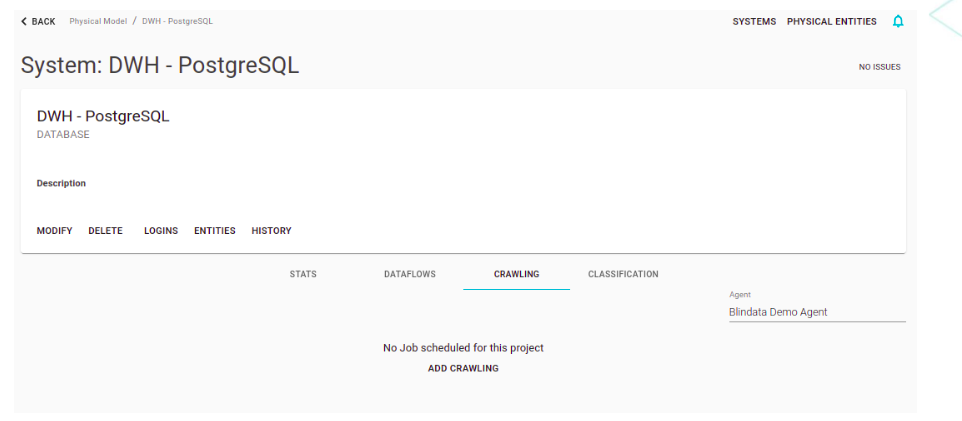
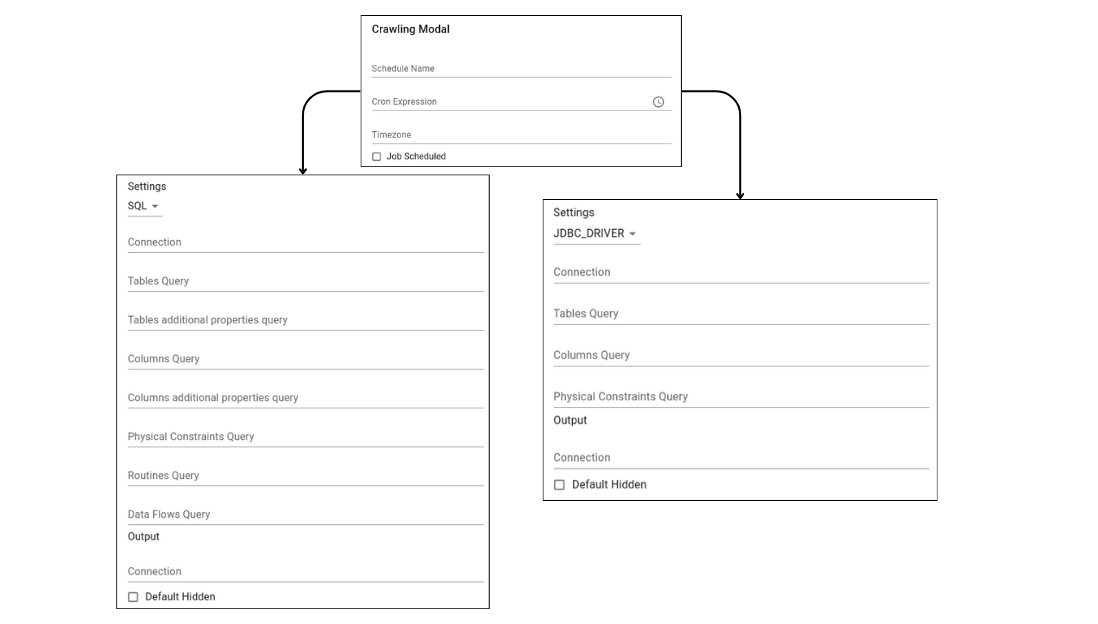
By pressing the ADD CRAWLING button, it is possible to define the details of the Job and test its execution. The details required by the form are as follows:
- Schedule name: (automatically set).
- Cron Expression: specify the schedule.
- Timezone: in which the cron expression is to be evaluated.
- Flag Job Scheduled: if enabled, it activates the scheduling and automatic execution of the crawling job according to the scheduling set by the cron expression.
- Strategy: specifies metadata reading strategy (SQL, JDBC DRIVER).
- Target connection: identifies the connection to the target system configured on the agent.
- Blindata Output Connection: identifies the credentials and the Blindata endpoint into which the results must be uploaded.
- Default Hidden: if enabled, all new physical entities are initially imported in hidden mode (this behavior can also be customized with the Tables Query).
- Automatic Cleanup: if enabled, the crawling job, after uploading all metadata to Blindata, will execute a cleanup on the system. This will eliminate all system’s resources that have not been updated (physical entities, physical fields, routines and data flows). The automatic cleanup has two additional options:
- Days from last update: (mandatory) this option specifies the number of days since the last update, beyond which elements will be deleted if they have not been updated.
- Dataflows scope: (optional) the scope of data flows that will be deleted if they have not been updated within the specified number of days.
JDBC Strategy
The JDBC strategy uses directly JDBC drivers to extract metadata, which is temporary stored in the following tables.
- Tables:
- catalog
- table_schema
- table_name
- table_type
- comment
- Columns:
- catalog
- table_schema
- table_name
- column_name
- data_type
- ordinal_position
- Physical Constraints:
- catalog
- name
- schema
- type
- clause
- update_rule
- delete_rule
- access_method
- list_order
- target_physical_entity_schema
- target_physical_entity_name
- referenced_physical_entity_schema
- referenced_physical_entity_name
- target_physical_field_name
- referenced_physical_field_name
Then using SQL queries (the following are the default ones), the metadata can be imported in Blindata as is, or additional information/transformations can be applied using the SQL syntax.
- Tables Query:
select table_schema, table_name, comment as description, null as data_set, table_type, false as is_hidden
from jdbc_metadata_tables
where table_type in ('TABLE','VIEW')
- Columns Query:
select table_schema, table_name, column_name, data_type, ordinal_position
from jdbc_metadata_columns
- Physical Constraints Query:
select
catalog ,
name ,
schema ,
type ,
clause ,
update_rule ,
delete_rule ,
access_method ,
list_order ,
target_physical_entity_schema ,
target_physical_entity_name ,
referenced_physical_entity_schema ,
referenced_physical_entity_name ,
target_physical_field_name ,
referenced_physical_field_name
from jdbc_metadata_constraints;
SQL Strategy
The SQL strategy directly executes an SQL query using the specified connection, to extract metadata and upload it on Blindata.
- Tables Query: the extraction query for metadata relating to physical entities (tables in the relational case)
select table_schema, table_name, table_type from information_schema.tables where table_schema not in ('INFORMATION_SCHEMA') - Tables Additional Properties Query: the extraction query for additional metadata relating to physical entities
- Columns Query: the extraction query for the metadata relating to the physical fields (columns in the relational case)
select table_schema, table_name, column_name, data_type, ordinal_position from information_schema.columns where table_schema not in ('INFORMATION_SCHEMA') - Columns Additional Properties Query: the extraction query for additional metadata relating to physical fields
- Physical Constraints Query: the extraction query for physical constraints metadata.
select distinct KCU.constraint_name as name, KCU.constraint_schema as schema, 'PRIMARY_KEY' as type, KCU.table_schema as target_physical_entity_schema, KCU.table_name as target_physical_entity_name, KCU.column_name as target_physical_field_name, KCU.ordinal_position as list_order, NULL as referenced_physical_entity_schema, NULL as referenced_physical_entity_name, NULL as referenced_physical_field_name, NULL as clause, null as delete_rule, null as update_rule, null as access_method from information_schema.table_constraints AS TC inner join information_schema.key_column_usage AS KCU on KCU.constraint_catalog = TC.constraint_catalog and KCU.constraint_schema = TC.constraint_schema and KCU.table_name = TC.table_name and KCU.constraint_name = TC.constraint_name where TC.constraint_type = 'PRIMARY KEY' union select distinct tc.constraint_name as name, tc.constraint_schema as schema, 'FOREIGN_KEY' as type, tc.table_schema as target_physical_entity_schema, tc.table_name as target_physical_entity_name, kcu.column_name as target_physical_field_name, kcu.ordinal_position as list_order, ccu.table_schema as referenced_physical_entity_schema, ccu.table_name as referenced_physical_entity_name, ccu.column_name as referenced_physical_field_name, NULL as clause, rc.delete_rule as delete_rule, rc.update_rule as update_rule, null as access_method from information_schema.table_constraints as tc join information_schema.key_column_usage as kcu on tc.constraint_name = kcu.constraint_name and tc.table_schema = kcu.table_schema join information_schema.constraint_column_usage as ccu on ccu.constraint_name = tc.constraint_name and ccu.table_schema = tc.table_schema join information_schema.referential_constraints rc on rc.constraint_name = kcu.constraint_name and kcu.column_name = ccu.column_name where tc.constraint_type = 'FOREIGN KEY' union select distinct KCU.constraint_name as name, KCU.constraint_schema as schema, 'UNIQUE' as type, KCU.table_schema as target_physical_entity_schema, KCU.table_name as target_physical_entity_name, KCU.column_name as target_physical_field_name, KCU.ordinal_position as list_order, NULL as referenced_physical_entity_schema, NULL as referenced_physical_entity_name, NULL as referenced_physical_field_name, NULL as clause, null as delete_rule, null as update_rule, null as access_method from information_schema.table_constraints AS TC inner join information_schema.key_column_usage AS KCU on KCU.constraint_catalog = TC.constraint_catalog and KCU.constraint_schema = TC.constraint_schema and KCU.table_name = TC.table_name and KCU.constraint_name = TC.constraint_name where TC.constraint_type = 'UNIQUE'; - Routines Query: the extraction query for routines metadata (procedures and functions) present in the system. The default below is PostgreSQL-oriented: it aliases the required columns and builds
ROUTINE_PARAMETERSas a JSON array ofIN/INOUTparameters (zero-basedpositionIndex). Replace it with a vendor-specific equivalent when needed.ROUTINE_DEFINITIONmust be the analyzable function body, not aCREATE FUNCTIONwrapper — that is required for table-valued function lineage .SELECT r.specific_name AS SPECIFIC_NAME, r.routine_catalog AS ROUTINE_CATALOG, r.routine_schema AS ROUTINE_SCHEMA, r.routine_name AS ROUTINE_NAME, r.routine_type AS ROUTINE_TYPE, r.routine_definition AS ROUTINE_DEFINITION, ( SELECT COALESCE( json_agg( json_build_object( 'name', p.parameter_name, 'dataType', p.data_type, 'positionIndex', p.ordinal_position - 1 ) ORDER BY p.ordinal_position ), '[]'::json ) FROM information_schema.parameters p WHERE p.specific_catalog = r.specific_catalog AND p.specific_schema = r.specific_schema AND p.specific_name = r.specific_name AND UPPER(COALESCE(p.parameter_mode, 'IN')) IN ('IN', 'INOUT') AND p.parameter_name IS NOT NULL AND p.parameter_name <> '' ) AS ROUTINE_PARAMETERS FROM information_schema.routines r WHERE r.routine_schema NOT IN ('information_schema', 'pg_catalog', 'INFORMATION_SCHEMA') - Data Flows Query: optional extraction query for dataflows. Available only with the SQL strategy. When provided, each result row is uploaded as a dataflow during the crawling job. Leave empty to skip dataflow import. See Data Flows Schema for required column aliases.
- Semantic Linking Physical Entity Query: the extraction query for semantic linking for physical entities
SELECT null AS physical_entity_schema, null AS physical_entity_name, null AS logical_namespace_name, null AS data_category_name - Semantic Linking Physical Fields Query: the extraction query for semantic linking for physical fields
SELECT
  null AS physical_entity_schema,
  null AS physical_entity_name,
  null AS logical_namespace_name,
  null AS data_category_name,
  null AS logical_field_name,
  null AS physical_field_name,
  null AS semantic_link_string
Fields for Extraction Queries
Each extraction query has its own list of aliases (mandatory/optional) that should be respected in order to correctly upload metadata inside Blindata.
Physical Entities Schema
The extraction aliases of the physical entities are:
| Property Name | Description | Mandatory/Optional |
|---|---|---|
| SYSTEM_NAME | The name of the Blindata system to which the table ( physicalEntity ) belongs. If this field is not specified, all the physicalEntities will be uploaded on the system associated to the Crawling Job. | Optional |
| TABLE_SCHEMA | The name of the schema (db) to which the table belongs | Mandatory |
| TABLE_NAME | The name of the table | Mandatory |
| TABLE_TYPE | The type of table (e.g. BASE_TABLE) | Mandatory |
| DESCRIPTION | The description of the table | Optional |
| IS_HIDDEN | Specifies if the physical entity should be loaded in hidden mode (default to false) | Optional |
Physical Entities Additional Properties Schema
| Property Name | Description | Mandatory/Optional |
|---|---|---|
| SYSTEM_NAME | The name of Blindata’s system where the physical entities is loaded. The default system is the one associated to the Crawling Job | Optional |
| SYSTEM_UUID | The uuid of Blindata’s system where the physical entities is loaded | Optional |
| PHYSICAL_ENTITY_NAME | The name of the physical entity (e.g. database table) | Mandatory |
| PHYSICAL_ENTITY_UUID | The Blindata identifier for the physical entity | Optional |
| SCHEMA | The schema of the physical entity | Mandatory |
| PROPERTY_NAME | The property key | Mandatory |
| PROPERTY_VALUE | The property value | Mandatory |
If SYSTEM_UUID is specified, SYSTEM_NAME could be not specified and vice versa. If PHYSICAL_ENTITY_UUID is specified, PHYSICAL_ENTITY_NAME and SCHEMA could be not specified and vice versa.
Physical Fields Schema
The physical fields extraction aliases are:
| Property Name | Description | Mandatory/Optional |
|---|---|---|
| TABLE_SCHEMA | The name of the schema (db) of the column’s table | Mandatory |
| TABLE_NAME | The name of the table to which the column belongs | Mandatory |
| COLUMN_NAME | The name of the column | Mandatory |
| DATA_TYPE | The type of the column | Optional |
| ORDINAL_POSITION | The number that defines the ordering of the column within the table. It becomes mandatory when you want to use the SQL Lineage module | Optional |
Physical Fields Additional Properties Schema
| Property Name | Description | Mandatory/Optional |
|---|---|---|
| SYSTEM_NAME | The name of Blindata’s system where the physical entities is loaded. The default system is the one associated to the Crawling Job | Optional |
| SYSTEM_UUID | The uuid of Blindata’s system where the physical entities is loaded | Optional |
| PHYSICAL_ENTITY_NAME | The name of the physical entity (e.g. database table) | Mandatory |
| PHYSICAL_ENTITY_UUID | The Blindata identifier for the physical entity | Optional |
| SCHEMA | The schema of the physical entity | Mandatory |
| PHYSICAL_FIELD_NAME | The name of the physical field | Mandatory |
| PHYSICAL_FIELD_UUID | The uuid of the physical field | Optional |
| PROPERTY_NAME | The property key | Mandatory |
| PROPERTY_VALUE | The property value | Mandatory |
If SYSTEM_UUID is specified, SYSTEM_NAME could be not specified and vice versa. If PHYSICAL_ENTITY_UUID is specified, PHYSICAL_ENTITY_NAME and SCHEMA could be not specified and vice versa. If PHYSICAL_FIELD_UUID is specified, PHYSICAL_FIELD_NAME and the physical entity’s fields could be not specified and vice versa.
System Routines Schema
The system routine aliases mirror those of the ANSI standard. The complete list comprehends:
| Property Name | Description | Mandatory/Optional |
|---|---|---|
| ROUTINE_CATALOG | The name of the catalog referenced by the routine | Mandatory |
| ROUTINE_SCHEMA | The name of the schema (db) referenced by the routine | Mandatory |
| ROUTINE_NAME | The name of the routine | Mandatory |
| SPECIFIC_NAME | The specific name of the routine often coincides with the name itself | Mandatory |
| ROUTINE_TYPE | Allowed values are usually PROCEDURE or FUNCTION | Mandator |
| DATA_TYPE | The return value of the function, valued only if the routine is a FUNCTION | Mandatory |
| CHARACTER_MAXIMUM_LENGTH | The maximum number of characters returned by the function type routine, in case it returns a string. NULL if the routine is a procedure | Mandatory |
| CHARACTER_OCTET_LENGTH | The maximum number of bytes returned by the function type routine, in case it returns a string. NULL if the routine is a procedure | Mandatory |
| NUMERIC_PRECISION | The numeric precision (the floating point number) in case the return value is numeric. NULL if the routine is a procedure | Mandatory |
| NUMERIC_SCALE | The numeric scale in case the return value of the function is numeric. NULL if the routine is a procedure | Optional |
| DATETIME_PRECISION | If the return value is a time value, it represents the time precision to the second. NULL if the routine is a procedure | Mandatory |
| CHARACTER_SET_NAME | The set of names if the return value is a string. NULL if the routine is a procedure | Mandatory |
| COLLATION_NAME | The comparison name in case the return value is a string. NULL if the routine is a procedure | Mandatory |
| DTD_IDENTIFIER | The type of the return value (String, numeric, etc.). NULL if the routine is a procedure | Mandatory |
| ROUTINE_BODY | The language used in defining the routine. Its value is always SQL | Mandatory |
| ROUTINE_DEFINITION | The SQL text of the routine. For SQL lineage, this must be the analyzable body (the statements that read or write rows), not vendor CREATE FUNCTION / GET_DDL wrappers. A trailing semicolon is optional. |
Mandatory |
| ROUTINE_PARAMETERS | JSON array of bindable parameters. Each object should include name (required), and may include dataType and zero-based positionIndex. If positionIndex is omitted, array order is used. Include IN / INOUT parameters; skip unnamed ones. Required for table-valued function argument lineage. Example: [{"positionIndex":0,"name":"start_date","dataType":"DATE"}] |
Optional |
| EXTERNAL_NAME | Value is always null | Mandatory |
| EXTERNAL_LANGUAGE | The language of the routine | Mandatory |
| PARAMETER_STYLE | The value is always SQL | Mandatory |
| IS_DETERMINISTIC | If the routine is deterministic, its value will be YES, otherwise NO | Mandatory |
| SQL_DATA_ACCESS | The characteristics of the access data of the routine. Its values can be: CONTAINS SQL, NO SQL, READS SQL DATA, MODIFIES SQL DATA | Mandatory |
| SECURITY_TYPE | Values can be either DEFINER or INVOKER | Mandatory |
| CREATED | Routine creation date. Its value is a TIMESTAMP | Mandatory |
| LAST_ALTERED | The routine was last modified. Its value is a TIMESTAMP | Mandatory |
| SQL_MODE | The SQL mode in effect when the routine was created or altered, and under which the routine executes | Mandatory |
| ROUTINE_COMMENT | The text of the comment, if the routine has one. If not, this value is empty | Mandatory |
| DEFINER | The account named in the DEFINER clause (often the user who created the routine), usually in ‘user_name’@‘host_name’ format | Mandatory |
| CHARACTER_SET_CLIENT | The character set that comes from the client | Mandatory |
| COLLATION_COLLECTION | The connection session value when the procedure was created | Mandatory |
| DATABASE_COLLATION | The collation of the database with which the routine is associated | Mandatory |
| SQL_PATH | The schema names used to resolve unqualified names within the routine | Mandatory |
Note
ROUTINE_PARAMETERS is optional for a catalog import, but without it Blindata cannot bind call-site arguments when the routine is used as a table-valued function. Vendor catalogs that number ORDINAL_POSITION from 1 must emit zero-based positionIndex (typically ordinal minus one). See Table-valued functions in SQL Lineage
.
Physical Constraints Schema
The extraction aliases of the physical constraints are:
| Property Name | Description | Mandatory/Optional |
|---|---|---|
| NAME | The name of the physical constraint. | Mandatory |
| SCHEMA | The schema of the physical constraint. | Mandatory |
| TYPE | The type of the physical constraint. Eg. PRIMARY_KEY, FOREIGN_KEY, INDEX. | Mandatory |
| CLAUSE | The definition of the physical constraint. | Optional |
| UPDATE_RULE | The physical constraint update rule. | Optional |
| DELETE_RULE | The delete rule of the physical constraint. | Optional |
| ACCESS_METHOD | The access method to the physical constraint. | Optional |
| LIST_ORDER | The position of the physical field/physical entity within the physical constraint. | Mandatory |
| TARGET_PHYSICAL_ENTITY_SCHEMA | The schema of the physical entity on which the physical constraint was defined. | Mandatory |
| TARGET_PHYSICAL_ENTITY_NAME | The name of the physical entity on which the physical constraint was defined. | Mandatory |
| TARGET_PHYSICAL_FIELD_NAME | The name of the physical field on which the physical constraint was defined. | Mandatory |
| REFERENCED_PHYSICAL_ENTITY_SCHEMA | The schema of the physical entity that is referenced by the physical constraint. | Optional |
| REFERENCED_PHYSICAL_ENTITY_NAME | The name of the physical entity that is referenced by the physical constraint. | Optional |
| SYSTEM_NAME | The name of Blindata’s system where the constraint should be loaded. | Optional |
Data Flows Schema
The Data Flows Query is evaluated only when the crawling strategy is SQL. The query must return one row per dataflow. Column labels are matched case-insensitively against the aliases below.
The extraction aliases of dataflows are:
| Property Name | Description | Mandatory/Optional |
|---|---|---|
| SCOPE | Tag that identifies the process or connector that loads the dataflow. Together with NAME, it uniquely identifies the dataflow. | Mandatory |
| NAME | The name of the dataflow. | Mandatory |
| FROM*SYSTEM_NAME | The name of the Blindata _system* where the flow starts. | Mandatory |
| TO*SYSTEM_NAME | The name of the Blindata _system* where the flow ends. | Mandatory |
| FROM*SYSTEM_UUID | The UUID of the source _system*. | Optional |
| TO*SYSTEM_UUID | The UUID of the destination _system*. | Optional |
| FROM*PHYSICAL_ENTITY_SCHEMA | The schema of the source _physical entity*. | Optional |
| FROM*PHYSICAL_ENTITY_NAME | The name of the source _physical entity*. | Optional |
| FROM*PHYSICAL_ENTITY_UUID | The UUID of the source _physical entity*. | Optional |
| FROM*PHYSICAL_FIELD_NAME | The name of the source _physical field*. | Optional |
| FROM*PHYSICAL_FIELD_UUID | The UUID of the source _physical field*. | Optional |
| TO*PHYSICAL_ENTITY_SCHEMA | The schema of the destination _physical entity*. | Optional |
| TO*PHYSICAL_ENTITY_NAME | The name of the destination _physical entity*. | Optional |
| TO*PHYSICAL_ENTITY_UUID | The UUID of the destination _physical entity*. | Optional |
| TO*PHYSICAL_FIELD_NAME | The name of the destination _physical field*. | Optional |
| TO*PHYSICAL_FIELD_UUID | The UUID of the destination _physical field*. | Optional |
Depending on which optional columns are present, each row can represent a flow at a different level:
- System to system — only the mandatory system columns (or UUIDs) are required.
- Physical entity to physical entity — also provide source and destination entity schema and name (or UUID).
- Physical field to physical field — also provide source and destination field name (or UUID).
If FROM_SYSTEM_UUID is specified, FROM_SYSTEM_NAME can be omitted and vice versa. The same rule applies to TO_SYSTEM_UUID / TO_SYSTEM_NAME, entity UUIDs vs. schema/name, and field UUIDs vs. names.
Referenced systems, physical entities, and physical fields must already exist in the catalog (typically imported by the same or another crawling job). Rows that cannot be reconciled are discarded during upload.
Example query at physical-entity level:
SELECT
  'etl-lineage' AS scope,
  source_schema || '.' || source_table || '->' || target_schema || '.' || target_table AS name,
  'Source DB' AS from_system_name,
  'Warehouse' AS to_system_name,
  source_schema AS from_physical_entity_schema,
  source_table AS from_physical_entity_name,
  target_schema AS to_physical_entity_schema,
  target_table AS to_physical_entity_name
FROM my_metadata.lineage_table
Semantic Link Physical Entities Schema
The extraction aliases of the semantic links for physical entities are:
| Property Name | Description | Mandatory/Optional |
|---|---|---|
| PHYSICAL_ENTITY_SYSTEM_UUID | The UUID of the system on which the physical entity refers to. | Optional |
| PHYSICAL_ENTITY_SYSTEM_NAME | The name of the system on which the physical entity refers to. | Mandatory |
| PHYSICAL_ENTITY_UUID | The UUID of the physical entity. | Optional |
| PHYSICAL_ENTITY_SCHEMA | The schema of the physical entity. | Mandatory |
| PHYSICAL_ENTITY_NAME | The name of the physical entity. | Mandatory |
| LOGICAL_NAMESPACE_UUID | The UUID of the logical namespace on which the data category (possibly) refers to. | Optional |
| LOGICAL_NAMESPACE_NAME | The name of the logical namespace on which the data category (possibly) refers to. | Optional |
| DATA_CATEGORY_UUID | The UUID of the data category (concept) that will be linked to the physical entity. | Optional |
| DATA_CATEGORY_NAME | The name of the data category (concept) that will be linked to the physical entity. | Mandatory |
If PHYSICAL_ENTITY_SYSTEM_UUID is specified, PHYSICAL_ENTITY_SYSTEM_NAME could be not specified and viceversa. By default, the system name taken is the one selected in the crawling job configuration.
If PHYSICAL_ENTITY_UUID is specified, PHYSICAL_ENTITY_SCHEMA and PHYSICAL_ENTITY_NAME could be not specified and viceversa.
If DATA_CATEGORY_UUID is specified, DATA_CATEGORY_NAME could be not specified and viceversa.
Semantic Link Physical Fields Schema
The extraction aliases of the semantic links for physical fields are:
| Property Name | Description | Mandatory/Optional |
|---|---|---|
| PHYSICAL_ENTITY_SYSTEM_UUID | The UUID of the system on which the physical entity refers to. | Optional |
| PHYSICAL_ENTITY_SYSTEM_NAME | The name of the system on which the physical entity refers to. | Mandatory |
| PHYSICAL_ENTITY_UUID | The UUID of the physical entity. | Optional |
| PHYSICAL_ENTITY_SCHEMA | The schema of the physical entity. | Mandatory |
| PHYSICAL_ENTITY_NAME | The name of the physical entity. | Mandatory |
| PHYSICAL_FIELD_UUID | The UUID of the physical field. | Optional |
| PHYSICAL_FIELD_NAME | The Name of the physical field. | Mandatory |
| LOGICAL_NAMESPACE_UUID | The UUID of the logical namespace on which the data category (possibly) refers to. | Optional |
| LOGICAL_NAMESPACE_NAME | The name of the logical namespace on which the data category (possibly) refers to. | Optional |
| DATA_CATEGORY_UUID | The UUID of the data category (concept) that will be used to resolve the logical field (attribute). | Optional |
| DATA_CATEGORY_NAME | The name of the data category (concept) that will be used to resolve the logical field (attribute). | Mandatory |
| LOGICAL_FIELD_UUID | The UUID of the logical field (attribute) that will be linked to the physical field. | Optional |
| LOGICAL_FIELD_NAME | The name of the logical field (attribute) that will be linked to the physical field. | Mandatory |
| SEMANTIC_LINK_STRING | The semantic link string that could be used to retrieve the logical field and semantic path. | Optional |
If PHYSICAL_ENTITY_SYSTEM_UUID is specified, PHYSICAL_ENTITY_SYSTEM_NAME could be not specified and viceversa. By default, the system name taken is the one selected in the crawling job configuration.
If PHYSICAL_ENTITY_UUID is specified, PHYSICAL_ENTITY_SCHEMA and PHYSICAL_ENTITY_NAME could be not specified and viceversa.
If DATA_CATEGORY_UUID is specified, DATA_CATEGORY_NAME could be not specified and viceversa.
If LOGICAL_FIELD_UUID is specified, LOGICAL_FIELD_NAME could be not specified and viceversa.
If SEMANTIC_LINK_STRING is specified, DATA_CATEGORY_UUID, DATA_CATEGORY_NAME, LOGICAL_FIELD_UUID and LOGICAL_FIELD_NAME could be not specified and viceversa. When a SEMANTIC_LINK_STRING and LOGICAL_FIELD are both specified, it will be done a coherence check that validate if the logical field provided matches the logical field present in the semantic link string.
Crawling Test and Execution
Once the crawling configuration has been compiled, it is possible to:
- TEST: execute the crawling job without uploading the results on Blindata. This shows only the number of information retrieved.
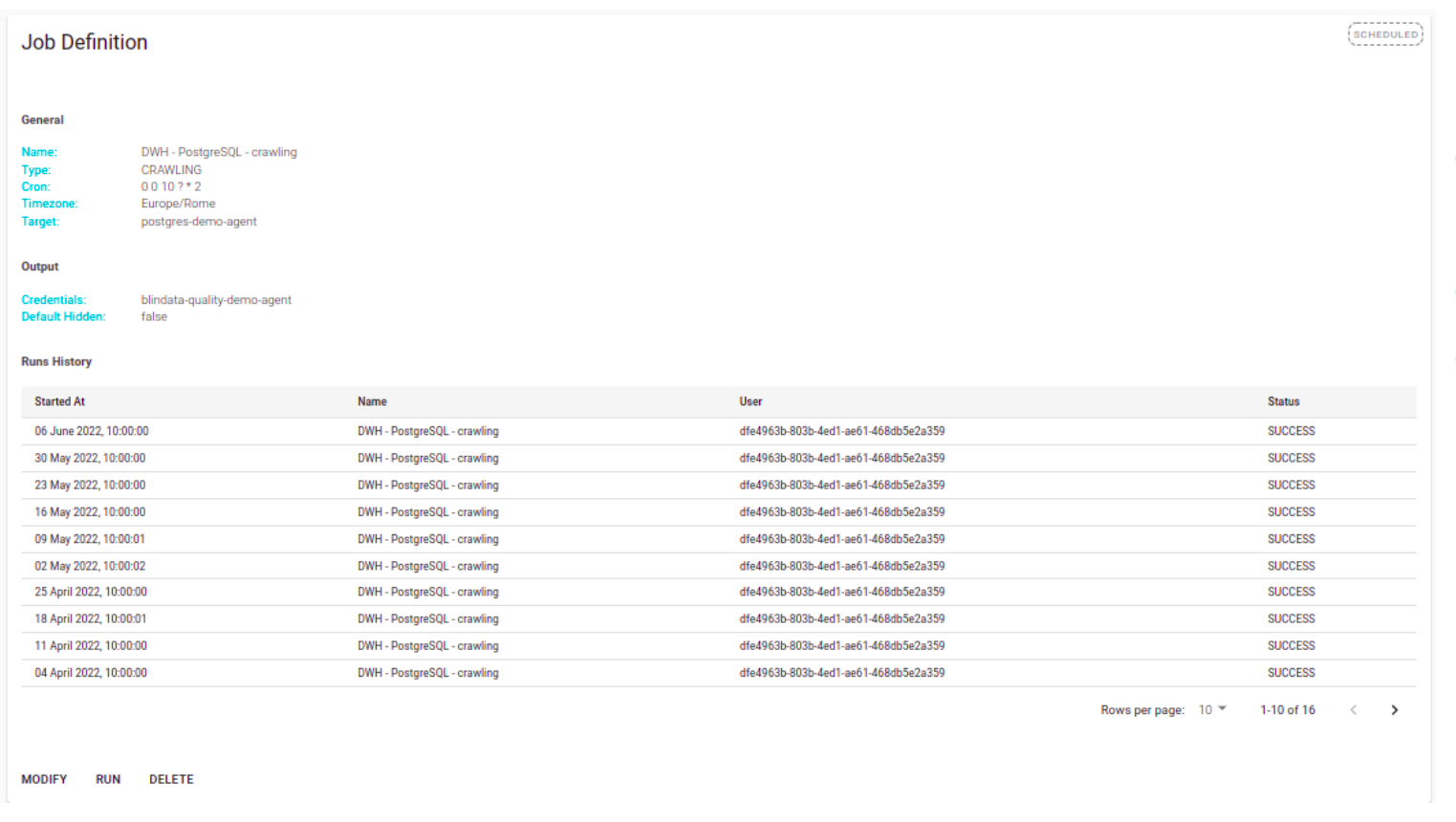
- RUN: manually execute the crawling job and the upload the result on Blindata. Alteratively the job can be run periodically without user intervention using the schedule option.
Configurations for common databases
Connection settings, required permissions and suggested extraction queries for each technology are in the Connector Catalog . For example:
- Relational databases: Oracle , PostgreSQL , MySQL , Microsoft SQL Server , IBM Db2 , SAP HANA
- Data warehouses and lakehouses: Snowflake , Google BigQuery , Amazon Redshift , Databricks , Apache Hive
- BI and analytics: TIBCO Spotfire
The defaults set by the crawling modal work in most cases. Use a technology-specific query when the source has no INFORMATION_SCHEMA (ANSI standard) or when extracting metadata through the JDBC driver is too slow.