
Data lineage reconstruction
The data lineage the Microsoft Fabric connector tracks, product by product, and how to read it in Blindata
The connector publishes lineage as data flows between the objects in your Blindata catalog: from a source table, file or column to a target one. Each flow names the Fabric item that moved the data, such as the pipeline, notebook or dataflow, so you can see both where data goes and what moves it.
Lineage from all Fabric products is joined into one graph, across workspaces, from the systems that feed Fabric to the Power BI content your users open.
The example below shows a typical setup. The top part is what exists in Fabric: a pipeline copies orders from an external Azure SQL database into a Bronze lakehouse, a notebook cleans them into Silver, a Gold warehouse view exposes them, and a semantic model in another workspace feeds a report. The bottom part is what Blindata rebuilds from it: each table, view and model column, linked column by column, with the pipeline, notebook or model that moved the data named on every flow.
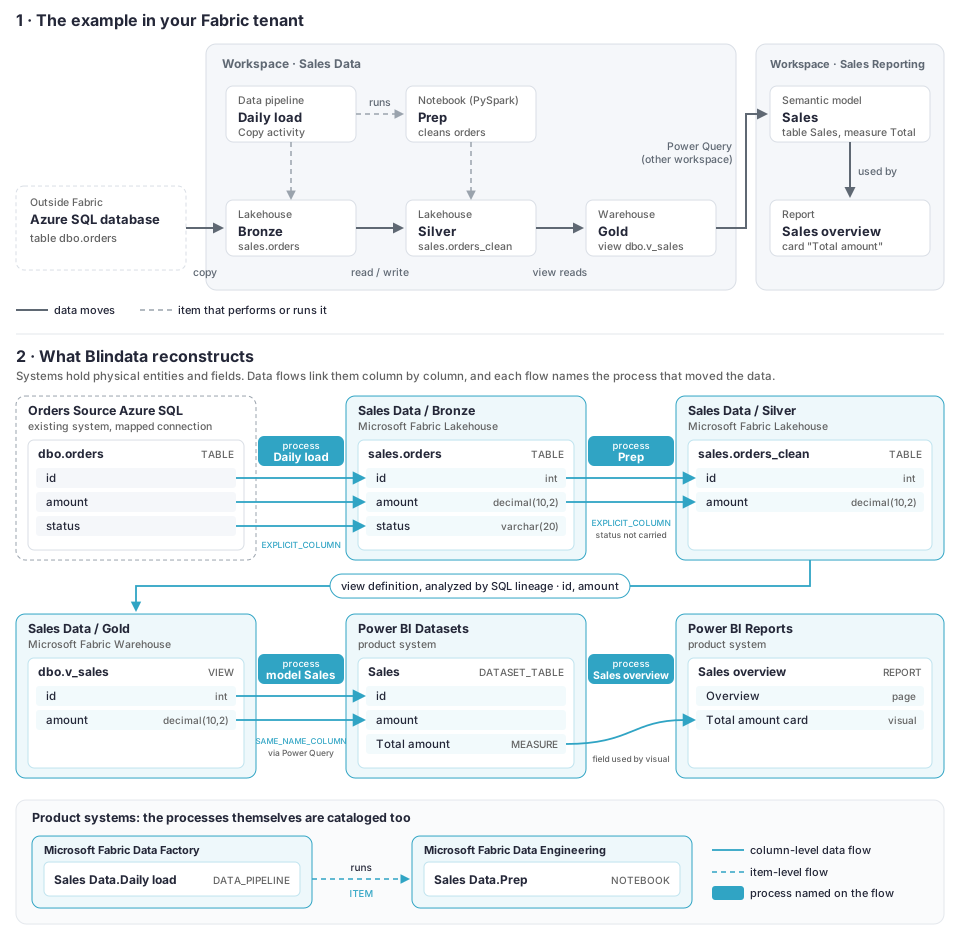
What a data flow tells you
Open a data flow in Blindata to see:
| Field | What it tells you | Example |
|---|---|---|
| From / To | The source and target table, file or column | Sales Data / Bronze · sales.orders → Sales Data / Silver · sales.orders_clean |
| Process | The Fabric item that moved the data | The pipeline, Copy job, dataflow, notebook or lakehouse that owns the shortcut |
| Evidence | How precise the flow is (see Levels of detail ) | evidence=EXPLICIT_COLUMN |
| Origin | Exactly where in the item the flow comes from | origin=pipeline=Daily load/Copy orders, origin=notebook=Prep/cell3 |
| Runs | For flows seen in pipeline run history: how many runs and the last one | runs=3; lastRun=2026-10-05 |
| Gap | Why some detail is missing, if any | gap=NO_TRANSLATOR |
Descriptions only contain object names. Parameter values, literals from code and the content of configuration tables are never written to Blindata.
Lineage by product
Data Factory
| You see | From → To | Detail |
|---|---|---|
| Copy activity in a pipeline | Source table or file → destination table or file | Table level always. Column level when the activity has a column mapping, or, with run history on, when source and destination columns match by name. |
| Copy job | Each source table → its destination table | Table level, and column level when the Copy job defines column mappings. |
| Dataflow Gen2 | Source tables → each query → its destination | Table level, and column level where the query’s steps show which column feeds which. |
| Native SQL in a Copy source or dataflow query | The tables the query reads → the destination | Analyzed by Blindata’s SQL lineage, down to the columns. |
| Script activity | The tables its SQL reads → the tables it writes | Analyzed by Blindata’s SQL lineage. Needs run history, which provides the SQL the activity ran. |
| Configuration tables read by Lookup or Get Metadata | Configuration table → pipeline | Shows which tables drive a metadata-driven pipeline. Marked CONTROL, as no data is moved. |
| Orchestration | Pipeline → child pipeline, notebook, Spark job, dataflow, Copy job or semantic model refresh | Item level. Shows which item runs which. |
| Mirroring | Source table → mirrored table | For mirrored databases and mirrored Snowflake databases. |
Data Engineering
| You see | From → To | Detail |
|---|---|---|
| Notebook code (opt-in) | Tables and files the code reads → tables and files it writes | Table and column level, for PySpark, Spark SQL and T-SQL. See Notebook code lineage . |
| Notebook calls | Notebook → each notebook it runs | Item level. |
| OneLake shortcut | The table or folder the shortcut points to → the shortcut | Table level, plus column level for the columns present on both sides. Folders at path level. |
| External shortcut | The external location → the shortcut | For locations whose connection you mapped to a Blindata system. |
Data Warehouse and Databases
| You see | From → To | Detail |
|---|---|---|
| View | The tables the view reads → the view | Column level, from the view definition, in warehouses, lakehouse SQL endpoints and SQL databases. |
| Stored procedure | The tables the procedure reads → the tables it writes | Analyzed from the procedure body by Blindata’s SQL lineage. |
| Mirroring | Source table → mirrored table | For mirrored warehouses and mirrored catalogs. |
Real-Time Intelligence
| You see | From → To | Detail |
|---|---|---|
| Eventstream | Each source → eventstream → each destination | Item level. |
| KQL update policy | Source table → target table | Table level. |
| KQL materialized view | Source table → materialized view | Table level. |
Power BI
| You see | From → To | Detail |
|---|---|---|
| Semantic model sources | Lakehouse, warehouse, datamart or external tables → semantic model tables | Column level. Covers Power Query (M) sources and Direct Lake. |
| Composite models | Semantic model → semantic model built on it | Item level. |
| Reports | Semantic model → report, and the model fields → the visuals that use them | Field level when report layout analysis is on. |
| Dashboards | Tile → dashboard | Item level. |
| Org apps | Report → the app that publishes it | Item level. |
| Dataflows Gen1 | Source tables → dataflow | Item level, from each query’s sources. |
Column lineage into semantic models follows products.powerBi.columnLineage
: by default, every model column is linked to the source column with the same name, or to the actual source column when Fabric reports it.
Graph
| You see | From → To | Detail |
|---|---|---|
| Graph model | Source tables → graph model | Column level, one flow per mapped node or edge property. |
Across items and workspaces
Fabric’s item relations add item-level links between items in the same workspace, such as a report and the semantic model it uses. A relation is published only when both items are cataloged as physical entities. Lakehouses, warehouses and other storage items are represented by their system, not by an entity, so relations to them (such as a notebook’s data-source link to a lakehouse) are not published. The lakehouses a notebook is attached to are listed on the notebook entity instead. Lineage crosses workspaces and products whenever the target or source is cataloged in Blindata, for example a notebook in one workspace writing to a lakehouse in another.
Levels of detail
Every flow carries an evidence level, from the most to the least precise. When several sources describe the same flow, the most precise one is kept.
| Evidence | Meaning | Typical source |
|---|---|---|
EXPLICIT_COLUMN |
Column to column, named explicitly | Copy column mapping, SELECT a AS b, withColumn("x", …) |
STRUCTURAL_COLUMN |
Column to column, carried through unchanged | SELECT *, shortcuts, merges by name |
COPY_DEFAULT_MAPPING |
Column to column, matched by name by a Copy activity without a mapping | Copy activities seen in run history |
SAME_NAME_COLUMN |
Column to column, matched by name | Power BI model columns |
TABLE |
Table to table | Any of the above, plus copies and code without column detail |
PATH |
File or folder to file or folder | Lakehouse Files/, file copies, folder shortcuts |
CONTROL |
A table that drives a pipeline, not data moved | Lookup and Get Metadata activities |
ITEM |
One item runs, uses or contains another | Pipeline runs notebook, report uses model |
Every column-level flow is accompanied by the table-level flow between the same tables.
Pipelines with dynamic content
Many pipelines get their source and target names from parameters, variables or a configuration table (a metadata-driven pipeline). Those names are not in the pipeline definition, so the connector can only publish them if it sees them in run history.
With runtime lineage
enabled, the connector reads recent pipeline runs and publishes the flows they actually performed. For example, a pipeline that reads a list of tables from meta.copy_tasks and copies each of them in a ForEach produces:
| Published flow | Evidence |
|---|---|
Bronze meta.copy_tasks → pipeline Daily load |
CONTROL |
Bronze sales.orders → Silver orders, with id, amount, status |
TABLE + COPY_DEFAULT_MAPPING |
Bronze sales.customers → Silver customers, with the mapped columns |
TABLE + EXPLICIT_COLUMN |
Pipeline Daily load → child pipeline Copy child |
ITEM |
- Flows performed by a child pipeline are attributed to the child, not to the parent.
- Flows with literal names are published even if the pipeline never ran.
- Without run history, the dynamic endpoints are reported as gaps (
UNRESOLVED_PARAMETER) instead of being guessed.
Choose how many runs to read per pipeline (the last N successful runs, or all runs of the last N days) in the job configuration .
Notebook code lineage
With notebook code analysis on (products.dataEngineering.notebookLineage), the connector reads the code of Spark and T-SQL notebooks, without running it, and publishes the tables and columns each notebook reads and writes.
What is recognized
| Code | Lineage |
|---|---|
Reads: spark.read.table, spark.table, spark.read…load(path), DeltaTable.forName / forPath |
Source tables and files |
Writes: saveAsTable, insertInto, toTable, save(path), writeTo(…) |
Target tables and files |
Delta merge, update, delete |
Target table, with the merge source |
DataFrame transformations: select, withColumn, renames, joins, unions, aggregations, windows |
Column-level flows |
Spark SQL, in cells or in spark.sql(…): CREATE TABLE AS SELECT, INSERT, INSERT OVERWRITE, MERGE, UPDATE, DELETE |
Table and column flows |
T-SQL: INSERT … SELECT, SELECT … INTO, CREATE TABLE AS SELECT, MERGE, UPDATE, DELETE, COPY INTO |
Table and column flows |
| Temporary views | Followed through to the tables behind them |
%run and notebookutils.notebook.run |
The included or called notebook’s code is analyzed too |
Table names built from notebook parameters are filled in with the values the notebook received from its pipeline runs (with runtime lineage on), from a calling notebook, or from the parameters cell. Writes inside an if the connector cannot decide are published and marked conditional=true.
Example. A notebook nb_bronze_copy, run by a pipeline for the tables customers and orders:
landing = spark.table(f"lh_landing.{source_table}")
landing.write.mode("append").saveAsTable(f"lh_bronze.{target_table}")
if landing.dropDuplicates(["id"]).count() < landing.count():
    landing.write.mode("append").saveAsTable(f"lh_bronze.{target_table}_error")
publishes:
lh_landing.customers → lh_bronze.customers         TABLE + columns
lh_landing.customers → lh_bronze.customers_error   TABLE + columns   conditional
lh_landing.orders    → lh_bronze.orders            TABLE + columns
lh_landing.orders    → lh_bronze.orders_error      TABLE + columns   conditional
Not analyzed: notebooks running on the plain Python kernel, Scala and R cells, shell commands, and libraries other than Spark and Delta (for example pandas or Polars). They are listed in the run report as not analyzed.
Keeping lineage up to date
- Each run republishes the lineage it finds, so flows follow your definitions as they change.
- Flows that no longer exist stay in Blindata until a cleanup removes the content not updated for the number of days you choose.
- Flows from run history stay current as long as the run window covers each pipeline’s schedule. For a monthly pipeline, use the default last successful run window rather than a window of a few days.
Why is my lineage missing?
The run report lists every flow that could not be published, with the reason. The most common ones:
| Reason | What it means | What to do |
|---|---|---|
TARGET_NOT_CATALOGUED |
The source or target table is not in the Blindata catalog. | Check that its workspace and item are in scope, and that catalogFilters do not exclude it. |
UNMAPPED_EXTERNAL_ENDPOINT |
The data comes from or goes to an external system that is not mapped. | Add the connection to connectionMappings
. |
UNRESOLVED_PARAMETER |
The table name depends on a parameter with no known value. | Enable runtime lineage, and make sure the pipeline ran within the window. |
NO_TRANSLATOR |
A Copy activity has no column mapping, so only the table flow is published. | Enable runtime lineage to match columns by name, or add a mapping. |
ACTIVITY_SECURED |
The activity uses Secure input, so its run values are hidden. | Expected: only the literal names are published. |
RUN_HISTORY_UNAVAILABLE |
The pipeline’s run history could not be read. | Check the application’s role on the workspace. |
NOTEBOOK_CODE_NOT_ANALYZED |
The notebook runs on the plain Python kernel, which is not analyzed. | Expected. Only the notebook’s attachments and calls are published. |
| No code flows for any notebook | Notebook code analysis is off (the default). | Enable products.dataEngineering.notebookLineage. |
AMBIGUOUS_NAME |
A notebook refers to a table without a default lakehouse, or the name matches more than one table. | Attach a default lakehouse, or qualify the name. |
VIEW_DEFINITION_UNAVAILABLE |
The view’s definition could not be read. | Check that the SQL endpoint is reachable and its capacity is running. |