
Microsoft Fabric
Catalog your whole Fabric estate (lakehouses, warehouses, databases, pipelines, notebooks, Real-Time Intelligence and Power BI) with end-to-end, column-level lineage.
Capabilities
| Capability | Support | Notes |
|---|---|---|
| Tables, views & columns | Supported | Workspaces, lakehouses, warehouses, SQL and KQL databases, OneLake files and shortcuts, pipelines, notebooks, dataflows, semantic models, reports and dashboards. |
| Keys, constraints & indexes | Not available | |
| Procedures & functions | Supported | Stored procedures and functions of lakehouse SQL endpoints, warehouses and SQL databases. |
| Data lineage | Supported | Column-level lineage across Data Factory, notebooks (PySpark, Spark SQL, T-SQL), views, Real-Time Intelligence and Power BI, across workspaces. |
| Lineage from query history | Not available | |
| Business glossary links | Not available | |
| Data quality probes | Supported | Probes run on lakehouses, warehouses and SQL databases through the SQL analytics endpoint, with a Microsoft SQL Server JDBC connection. |
| Data profiling | Supported | Profiling monitors run through the SQL analytics endpoint, with a Microsoft SQL Server JDBC connection. |
| Data classification | Not available | |
| Chat with your data | Not available |
Overview
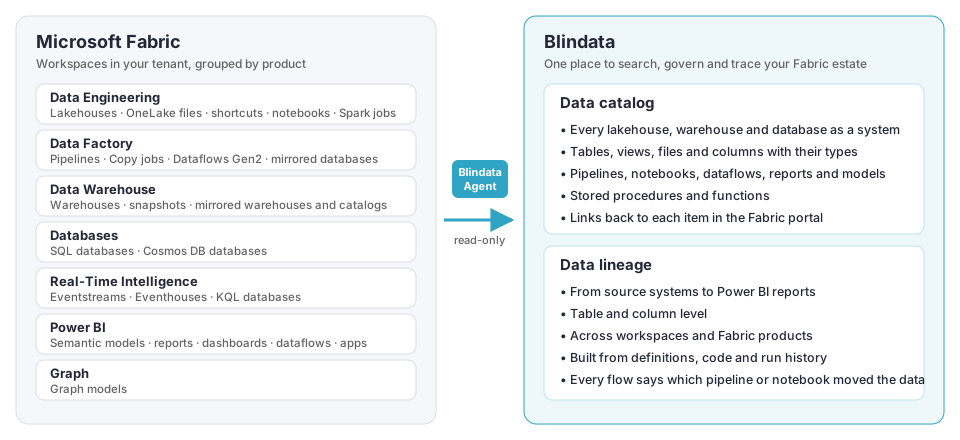
The Microsoft Fabric connector brings your whole Fabric estate into Blindata: every lakehouse, warehouse, database, pipeline, notebook and Power BI asset, together with the lineage that connects them. Your data teams get one searchable catalog, and they can follow any dataset from the source system that feeds it to the reports that use it.
Highlights
What is covered
The tables below list every Fabric item type the connector handles, grouped by Fabric product as in the Fabric portal.
- Catalog: the item and its content are imported as metadata.
- Lineage: the connector traces the data flowing into and out of the item.
Legend: ✅ supported · ⚠️ partial, see the notes · ❌ not supported
Data Engineering
Lakehouses, their files and shortcuts, and the Spark code that transforms them.
| Item | Catalog | Lineage | What you get |
|---|---|---|---|
| Lakehouse | ✅ | ✅ | Tables, views, columns with their types, stored procedures and functions. |
| OneLake files | ✅ | ✅ | Folders and files under Files/, listed up to a configurable depth. |
| Shortcuts | ✅ | ✅ | Each shortcut is linked to the table or folder it points to, in OneLake or in an external storage you have mapped. |
| Notebook | ✅ | ✅ | The notebook, its attached lakehouses and the notebooks it calls. With code analysis on, the tables and columns that its PySpark, Spark SQL and T-SQL code reads and writes. |
| Spark job definition | ✅ | ❌ | Cataloged with its main file, language and attached lakehouses. Its code is not analyzed. |
Data Factory
The pipelines and dataflows that move data into and across Fabric.
| Item | Catalog | Lineage | What you get |
|---|---|---|---|
| Data pipeline | ✅ | ✅ | Copy activities at table and column level, the pipelines, notebooks, dataflows and Copy jobs it runs, and the configuration tables that drive it. |
| Copy job | ✅ | ✅ | Every source-to-destination copy it performs. |
| Dataflow Gen2 | ✅ | ✅ | Each query, with its sources, destinations and column mappings. Native SQL in a query is analyzed. |
| Mirrored database | ✅ | ✅ | The mirrored tables, linked to their source tables. |
| Mirrored Snowflake database | ✅ | ✅ | The mirrored tables, linked to their source tables. |
| Apache Airflow job, dbt job, mounted Data Factory | ⚠️ | ❌ | Listed in the catalog only. |
Data Warehouse
Warehouses and the SQL objects inside them.
| Item | Catalog | Lineage | What you get |
|---|---|---|---|
| Warehouse | ✅ | ✅ | Tables, views, columns with their T-SQL types, stored procedures and functions. Lineage from view and procedure definitions. |
| Warehouse snapshot | ✅ | ✅ | Same as a warehouse. |
| Mirrored warehouse | ✅ | ✅ | The mirrored tables, linked to their source tables. |
| Mirrored catalog (including Azure Databricks) | ✅ | ✅ | The mirrored tables, linked to their source tables. |
| SQL analytics endpoint | — | — | Not a separate item in Blindata: it adds T-SQL types, views and routines to the lakehouse or warehouse it belongs to. |
Databases
Operational databases running in Fabric.
| Item | Catalog | Lineage | What you get |
|---|---|---|---|
| SQL database | ✅ | ✅ | Tables, views, columns, stored procedures and functions. Lineage from view definitions. |
| Cosmos DB database | ✅ | ✅ | Same as a SQL database. |
Real-Time Intelligence
Streaming ingestion and KQL analytics.
| Item | Catalog | Lineage | What you get |
|---|---|---|---|
| Eventstream | ✅ | ✅ | The eventstream, linked to its sources and destinations. |
| KQL database | ✅ | ✅ | Tables and materialized views with their columns. Lineage from update policies and materialized views. |
| Eventhouse | ⚠️ | ❌ | Listed in the catalog only. Its KQL databases are cataloged on their own. |
Power BI
The semantic models and reports your business users work with.
| Item | Catalog | Lineage | What you get |
|---|---|---|---|
| Semantic model | ✅ | ✅ | Tables, columns and measures with their DAX expressions. Linked to the lakehouse, warehouse or external tables it reads, including Direct Lake and Power Query sources. |
| Report | ✅ | ✅ | Pages, visuals and the model fields each visual uses. Linked to its semantic model. |
| Dashboard | ✅ | ✅ | Dashboards and their tiles. |
| Dataflow (Gen1) | ✅ | ✅ | Its entities, linked to their sources. |
| Datamart | ✅ | ✅ | Tables, columns and views, linked to the semantic models built on it. |
| Org app | ✅ | ✅ | The app, linked to the reports it publishes. |
| Paginated report | ❌ | ❌ | Not supported. |
Graph
| Item | Catalog | Lineage | What you get |
|---|---|---|---|
| Graph model | ✅ | ✅ | Node and edge types, linked to the tables they are built from. |
Other Fabric items, such as ML models, experiments, environments and KQL querysets, are counted in the run report but not cataloged.
Lineage at a glance
The connector joins lineage from every product, so a single path in Blindata can start in an external database and end in a Power BI dashboard.
| From | To | Traced through |
|---|---|---|
| External databases and storage | Lakehouses, warehouses | Pipeline Copy activities, Copy jobs, Dataflows Gen2, external shortcuts, mirroring |
| Lakehouse tables and files | Other lakehouse tables and files | Notebooks, Dataflows Gen2, pipelines, OneLake shortcuts |
| Warehouse and SQL database tables | Views and other tables | View and stored procedure definitions, T-SQL notebooks, pipeline scripts |
| Lakehouses, warehouses, datamarts | Semantic models | Power Query sources, Direct Lake |
| Semantic models | Reports, dashboards, apps | Report visuals, dashboard tiles, app content |
| Pipelines | Notebooks, dataflows, Copy jobs, child pipelines | Pipeline orchestration |
Details and examples are in Data lineage .
Getting started
- Prepare your Fabric tenant : register an application and give it read access to Fabric.
- Configure the job : create the connection and the job in the Blindata Agent, run a dry run, then publish.
- Explore the result: see Fabric to Blindata catalog and Data lineage reconstruction .
Known limitations
- Plain Python notebooks (not running on Spark) are cataloged, but their code is not analyzed. Scala and R cells are not analyzed either.
- Values known only at run time, such as table names passed as pipeline parameters, are resolved only when pipeline run history is enabled and a recent run supplied them. Otherwise the gap is reported.
- External systems appear in the lineage only when you map their Fabric connection to a system you already catalog in Blindata. The connector does not create systems for them.
- Paginated reports and Spark job definition code are not analyzed.
- Tenant-wide discovery and Power BI need access to the Fabric read-only admin APIs. Without it, the connector can still read the workspaces the application has been added to, without Power BI.