
Fabric to Blindata catalog
How Microsoft Fabric workspaces, items, tables and columns appear in the Blindata catalog
This page explains where each Fabric object lands in the Blindata catalog, so you know what to look for after a run.
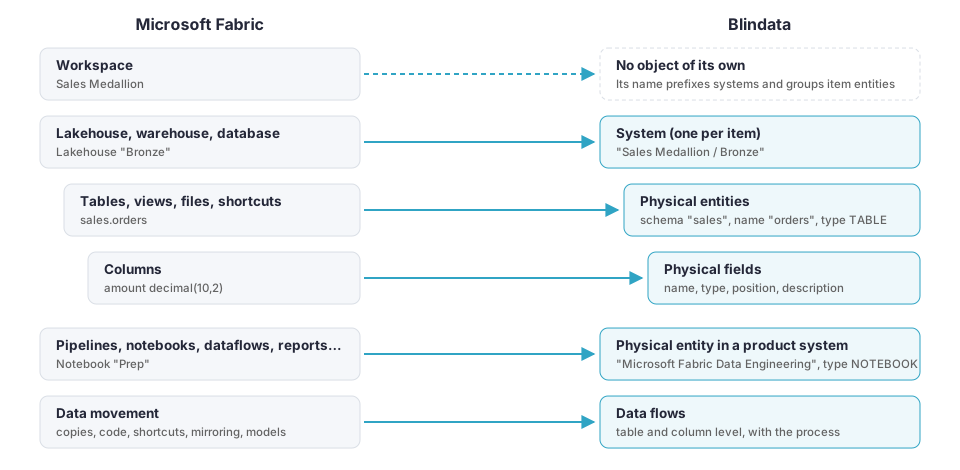
The rule of thumb:
- An item that stores data (a lakehouse, a warehouse, a database) becomes a system of its own.
- What it contains (tables, views, files) becomes physical entities, and their columns become physical fields.
- An item that processes or presents data (a pipeline, a notebook, a report) becomes a physical entity inside a shared product system, such as Microsoft Fabric Data Factory.
- Data moving between them becomes data flows. See Data lineage .
The workspace has no object of its own: its name prefixes the system names and groups the item entities inside product systems.
Systems
One system per data store
| Fabric item | Blindata system | Technology |
|---|---|---|
| Lakehouse | <workspace> / <lakehouse> |
Microsoft Fabric Lakehouse |
| Warehouse, warehouse snapshot | <workspace> / <warehouse> |
Microsoft Fabric Warehouse |
| Mirrored database, mirrored warehouse | <workspace> / <item> |
Microsoft Fabric Mirrored Database |
| Mirrored catalog | <workspace> / <item> |
Microsoft Fabric Mirrored Catalog |
| Mirrored Snowflake database | <workspace> / <item> |
Microsoft Fabric Snowflake Database |
| SQL database | <workspace> / <database> |
Microsoft Fabric SQL Database |
| Cosmos DB database | <workspace> / <database> |
Microsoft Fabric Cosmos DB |
| KQL database | <workspace> / <database> |
Microsoft Fabric KQL Database |
| Datamart | <workspace> / <datamart> |
Microsoft Fabric Datamart |
You can change the name pattern, lowercase it, or pin an item to a system that already exists in Blindata with systemNaming
.
One system per product
| Product system (default name) | Contains |
|---|---|
| Microsoft Fabric Data Engineering | Notebooks, Spark job definitions |
| Microsoft Fabric Data Factory | Pipelines, Copy jobs, Dataflows Gen2 and their queries, Airflow and dbt jobs |
| Microsoft Fabric Real-Time Intelligence | Eventstreams, eventhouses |
| Microsoft Fabric Graph | Graph models |
| Power BI Datasets | Semantic models with their tables, columns and measures, Gen1 dataflows |
| Power BI Reports | Reports, dashboards and tiles, org apps |
Product systems are created only when the run publishes at least one of their items. You can rename them or point them to existing systems under products
.
Physical entities
| Fabric object | System | Schema | Name | Type |
|---|---|---|---|---|
| Lakehouse, warehouse or database table | The item’s system | Table schema (dbo when the lakehouse has no schemas) |
Table name | TABLE |
| View | The item’s system | View schema | View name | VIEW |
| Lakehouse folder or file | The lakehouse system | Files |
Path under Files/, such as raw/2024/orders.csv |
FOLDER, FILE |
| Shortcut | The lakehouse system | As the table or folder it exposes | As the table or folder it exposes | SHORTCUT |
| KQL table, materialized view | The KQL database system | none (KQL has no schemas) | Table or view name | TABLE, MATERIALIZED_VIEW |
| Pipeline, Copy job, Dataflow Gen2 | Data Factory | Workspace name | Item name | DATA_PIPELINE, COPY_JOB, DATAFLOW_GEN2 |
| Dataflow Gen2 query | Data Factory | <workspace>.<dataflow> |
Query name | DATAFLOW_QUERY |
| Notebook, Spark job definition | Data Engineering | Workspace name | Item name | NOTEBOOK, SPARK_JOB_DEFINITION |
| Eventstream, eventhouse | Real-Time Intelligence | Workspace name | Item name | EVENTSTREAM, EVENTHOUSE |
| Graph model | Graph | Workspace name | Item name | GRAPH_MODEL |
| Semantic model | Power BI Datasets | Workspace name | Model name | DATASET |
| Semantic model table | Power BI Datasets | <workspace>.<model> |
Table name | DATASET_TABLE |
| Dataflow Gen1, and its entities | Power BI Datasets | Workspace name, or <workspace>.<dataflow> for entities |
Dataflow or entity name | DATAFLOW, DATAFLOW_ENTITY |
| Report, dashboard | Power BI Reports | Workspace name | Item name | REPORT, DASHBOARD |
| Org app | Power BI Reports | Workspace name | App <app id> |
ORG_APP |
| Dashboard tile | Power BI Reports | <workspace>.<dashboard> |
Tile title | TILE |
| Item listed as inventory only | Its product system | Workspace name | Item name | The Fabric item type |
Physical fields
| Fabric object | Blindata field | Type |
|---|---|---|
| Table or view column | Column name, position and comment | The T-SQL type from the SQL endpoint, such as decimal(10,2); otherwise the Spark type, such as double |
| KQL column | Column name | KQL type |
| Semantic model column | Column name, with format, category and sort-by column | Column data type |
| Measure | Measure name, with its DAX expression as description | MEASURE |
| Report page, visual | Page or visual name | REPORT_SECTION, or the visual kind |
Stored procedures and functions of lakehouses, warehouses and SQL databases are published as system routines with their definition, so Blindata’s SQL lineage can analyze them. View definitions are published as query statements in a query bucket named <system> (Fabric SQL).
Properties
Each entity carries additional properties that tie it back to Fabric. The most useful ones:
| Property | Meaning |
|---|---|
fabricWorkspaceName, fabricWorkspaceId |
Workspace the item belongs to |
fabricItemId, fabricItemType |
The Fabric item, and its type such as Lakehouse or Notebook |
fabricPortalUrl |
Link to open the item in the Fabric or Power BI portal |
oneLakePath |
Path of a table or file in OneLake |
shortcutTarget |
Where a shortcut points to |
sqlEndpointHost |
SQL endpoint of the item |
fabricMetadataGap |
Why some metadata is missing, for example COLUMNS_UNAVAILABLE, VIEW_DEFINITION_UNAVAILABLE, FILES_LISTING_TRUNCATED or ACCESS_DENIED:WORKSPACE_ROLE |
Notebooks also list their attached lakehouses, language and environment and, with code analysis on, their kernel, parameters and analysis status.
The connector sets no tags and creates no tasks or logical entities.
Example
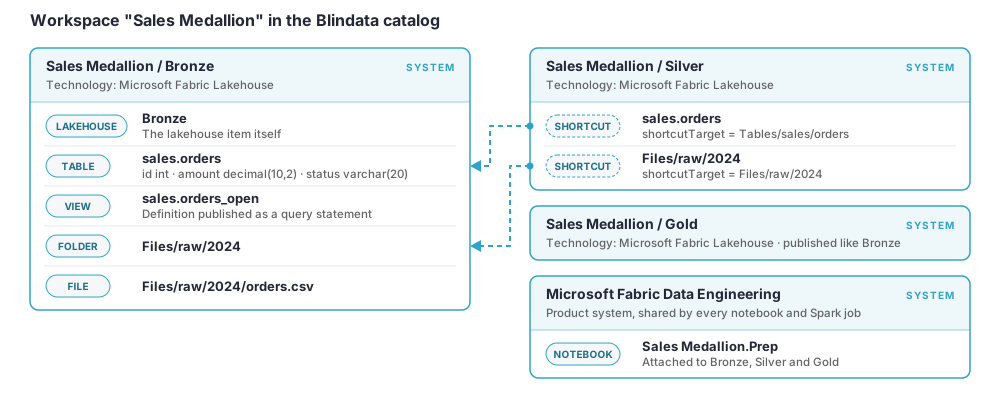
A workspace Sales Medallion with three lakehouses (Bronze, Silver, Gold) and a notebook produces four systems. Silver holds shortcuts to the Bronze data, so its entities point back to Bronze instead of copying it.
Re-runs and changes
You can run the job again as often as you like. Each run updates what is already in Blindata instead of adding a second copy.
| What changes in Fabric | What happens in Blindata |
|---|---|
| A workspace or item is renamed | The existing system is renamed. Systems are matched to their Fabric item by ID, so no new system appears. |
| A table, column or other object changes | The entity or field is updated in place, with no duplicates. Data flows are updated in the same way. |
| An object is deleted | It stays in Blindata. It is removed only by the optional cleanup, which deletes content of a published system that has not been updated for a number of days. See cleanupOptions
. |
| The application cannot read an item | The item is still published, with a fabricMetadataGap property that says why its content is missing, such as ACCESS_DENIED:WORKSPACE_ROLE. |
A system’s description and technology are written only when the system is created. Edit them in Blindata afterwards and later runs keep your changes.
Note
Cleanup runs only after a complete, unfiltered run, so a partial run never removes content by mistake. The conditions are listed under cleanupOptions
.