
Configure your producers
Point the OpenLineage Python client, Spark, Airflow, dbt, Flink and Trino at the Blindata Agent, with the headers it needs, and send a batch of events with curl
This page shows how to make each kind of producer send its events to the Blindata Agent. Complete Set up the endpoint first: you need the agent address, the uuid of the producer’s job definition, the tenant uuid, and the user name and API key of an application user.
The settings below were checked against the official OpenLineage, Apache Airflow and Trino documentation (and the client sources) on 2026-11-03. Option names and defaults can change between releases: when in doubt, follow the linked official page.
Supported producers
Any tool that emits OpenLineage events over HTTP can send them. The table lists the producers whose specific facets Blindata reads. The complete list is in Facet support reference .
| Producer | What Blindata uses | How the job namespace is set | Typical mode |
|---|---|---|---|
| OpenLineage Python client (your own code, CI steps) | Everything you put in the events, JobEvents included. |
In the event you build. | BATCH_SNAPSHOT for a repository, ADDITIVE for runtime events |
Apache Airflow (provider openlineage) |
Jobs and datasets of operators, the DAG task graph (orchestration flows), run properties, gaps for operators without lineage. | namespace option of the provider. |
ADDITIVE |
| Apache Spark (Databricks, Dataproc and others on the Spark listener) | Inputs and outputs, column lineage, Spark and Databricks run properties, a gap when the plan was not fully handled. | spark.openlineage.namespace. |
ADDITIVE |
dbt (dbt-ol) |
Models, sources and their lineage, dbt properties on jobs and datasets. | OPENLINEAGE_NAMESPACE. |
ADDITIVE |
| Apache Flink | Inputs and outputs, flink_job property. |
See the Flink page. | ADDITIVE |
| Trino (event listener) | Inputs and outputs of write queries, the query id. | openlineage-event-listener.namespace, default derived from trino://<host>:<port>. |
ADDITIVE |
| Apache Hive (hook) | hive_query property. |
See the Hive integration page. | ADDITIVE |
| Great Expectations | Assertions as quality results. | See the integration page. | ADDITIVE |
| Google Cloud (Composer, Dataproc), Iceberg, BigQuery and Redshift Data providers | Their facets as listed in the facet reference. | ADDITIVE |
The job namespace of a producer must match the allowedJobNamespaces of its job definition. The list of official integrations is at openlineage.io/docs/integrations/about
.
The address in every client
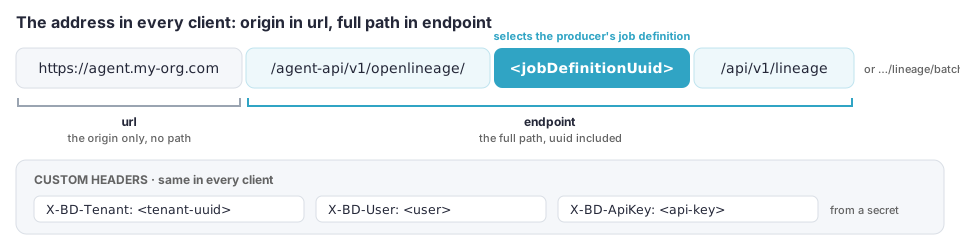
The address of a producer is https://<agent>/agent-api/v1/openlineage/<jobDefinitionUuid>/api/v1/lineage. OpenLineage clients do not combine a base URL and the default endpoint in the same way, so the safe setting is:
| Client option | Value |
|---|---|
url |
The origin of the agent only: https://<agent-host>[:<port>], with no path. |
endpoint |
The full path: /agent-api/v1/openlineage/<jobDefinitionUuid>/api/v1/lineage. |
Why not put the uuid in url and keep the default endpoint:
- The Java client (Spark, Flink, Trino) uses the path of
urlas it is, without appending the defaultapi/v1/lineage, and refuses aurlwith a path together with anendpoint. - The Python client (Python, Airflow, dbt) joins
urlandendpointas URLs do: without a trailing slash inurl, the last segment (the uuid) is replaced.
If the agent is published under a path prefix (for example behind a reverse proxy at https://host/blindata), put the prefix in url and write the endpoint without the leading slash in the Python-based clients. For the Java-based ones, set the complete address in url and leave endpoint unset.
In every example below, replace the placeholders <agent-host>, <jobDefinitionUuid>, <tenant-uuid>, <user> and <api-key>. The headers are the same everywhere:
| Header | Value |
|---|---|
X-BD-Tenant |
<tenant-uuid> |
X-BD-User |
<user> |
X-BD-ApiKey |
<api-key> |
Warning
The API key is a secret. Do not commit it: inject it from your secret store, as an environment variable or a CI secret, when the configuration file or the properties are generated.
OpenLineage Python client
The HTTP transport is configured in openlineage.yml. The client reads it from the path in the OPENLINEAGE_CONFIG environment variable, from the current working directory, or from ~/.openlineage/openlineage.yml.
transport:
  type: http
  url: https://<agent-host>
  endpoint: /agent-api/v1/openlineage/<jobDefinitionUuid>/api/v1/lineage
  compression: gzip
  custom_headers:
    X-BD-Tenant: <tenant-uuid>
    X-BD-User: <user>
    X-BD-ApiKey: <api-key>
compression: gzipis the only compression the client offers, and the agent accepts it.- Do not set
auth: theapi_key,jwtandoauth2options do not match Blindata authentication (see Authentication ). - The default
timeoutis 5 seconds and the client retries on500,502,503and504, which fits the503 Inbox fullanswer.
Reference: OpenLineage Python client configuration .
Apache Spark
Add the OpenLineage Spark listener to the application, with the version of the OpenLineage Spark package that matches your Spark and Scala versions (see the official Spark integration
), and set these properties in spark-defaults.conf, with --conf or in the session builder:
spark.extraListeners=io.openlineage.spark.agent.OpenLineageSparkListener
spark.openlineage.namespace=my-spark-prod
spark.openlineage.transport.type=http
spark.openlineage.transport.url=https://<agent-host>
spark.openlineage.transport.endpoint=/agent-api/v1/openlineage/<jobDefinitionUuid>/api/v1/lineage
spark.openlineage.transport.compression=gzip
spark.openlineage.transport.headers.X-BD-Tenant=<tenant-uuid>
spark.openlineage.transport.headers.X-BD-User=<user>
spark.openlineage.transport.headers.X-BD-ApiKey=<api-key>
The custom headers are set by appending the header name to spark.openlineage.transport.headers.. On Databricks, put the properties in the cluster’s Spark configuration and keep the key in a secret scope.
References: Spark transport configuration , Spark configuration usage .
Apache Airflow
The OpenLineage provider takes the transport as a JSON string in the [openlineage] section of airflow.cfg, or in the equivalent environment variable. Underneath, the provider uses the Python client, so the keys are those of the Python client transport.
[openlineage]
namespace = airflow-prod
transport = {"type": "http", "url": "https://<agent-host>", "endpoint": "/agent-api/v1/openlineage/<jobDefinitionUuid>/api/v1/lineage", "compression": "gzip", "custom_headers": {"X-BD-Tenant": "<tenant-uuid>", "X-BD-User": "<user>", "X-BD-ApiKey": "<api-key>"}}
AIRFLOW__OPENLINEAGE__TRANSPORT='{"type": "http", "url": "https://<agent-host>", "endpoint": "/agent-api/v1/openlineage/<jobDefinitionUuid>/api/v1/lineage", "compression": "gzip", "custom_headers": {"X-BD-Tenant": "<tenant-uuid>", "X-BD-User": "<user>", "X-BD-ApiKey": "<api-key>"}}'
The namespace option is the job namespace of the DAGs and tasks: it must match allowedJobNamespaces. If you leave it out, the provider uses default. The provider reads transport first, so a YAML file named by config_path is only used when transport is not set. Setting disabled to true stops the events without uninstalling the provider.
Use a ADDITIVE definition with a cron schedule. The DAG task graph (downstream_task_ids) becomes orchestration flows
between the task jobs.
References: Airflow OpenLineage provider, user guide , Python client configuration .
dbt (dbt-ol)
openlineage-dbt uses the Python client, so the openlineage.yml shown for the Python client works for it: point OPENLINEAGE_CONFIG at it (or keep it in the directory where you run dbt-ol) and run dbt through the wrapper.
pip install openlineage-dbt
export OPENLINEAGE_CONFIG=./openlineage.yml
export OPENLINEAGE_NAMESPACE=dbt-prod
dbt-ol run
OPENLINEAGE_NAMESPACE sets the job namespace (the default namespace otherwise), and must match allowedJobNamespaces. The page of the dbt integration documents OPENLINEAGE_URL for the simplest setups, which cannot carry the Blindata headers: use the file.
References: dbt integration , Python client configuration .
Apache Flink
On Flink 2.x, register the OpenLineage listener, and configure the transport with the Java client format, in an openlineage.yml that the OPENLINEAGE_CONFIG environment variable points to:
execution.job-status-changed-listeners=io.openlineage.flink.listener.OpenLineageJobStatusChangedListenerFactory
transport:
  type: http
  url: https://<agent-host>
  endpoint: /agent-api/v1/openlineage/<jobDefinitionUuid>/api/v1/lineage
  compression: gzip
  headers:
    X-BD-Tenant: <tenant-uuid>
    X-BD-User: <user>
    X-BD-ApiKey: <api-key>
Note that the Java format names the headers headers, not custom_headers. The openlineage-flink package must be on the Flink classpath. Flink 1.x has its own integration page. The Flink page does not list the transport keys that you can set in Flink’s own configuration: use the file, or check the Java client configuration
.
References: Flink 2.x integration , Flink configuration .
Trino
The OpenLineage event listener is configured in a properties file of the coordinator. Create etc/openlineage-event-listener.properties and add it to event-listener.config-files in the coordinator configuration:
event-listener.name=openlineage
openlineage-event-listener.trino.uri=https://<trino-host>:8443
openlineage-event-listener.transport.type=HTTP
openlineage-event-listener.transport.url=https://<agent-host>
openlineage-event-listener.transport.endpoint=/agent-api/v1/openlineage/<jobDefinitionUuid>/api/v1/lineage
openlineage-event-listener.transport.compression=gzip
openlineage-event-listener.transport.headers=X-BD-Tenant:<tenant-uuid>,X-BD-User:<user>,X-BD-ApiKey:<api-key>
- The headers are
name:valuepairs separated by commas. A comma or a colon inside a value must be escaped with a backslash. openlineage-event-listener.trino.uriis required and gives the default job namespace,trino://<host>:<port>. Setopenlineage-event-listener.namespacefor another one. The namespace must matchallowedJobNamespaces.- By default the listener reports
DELETE,INSERT,MERGE,UPDATEandALTER_TABLE_EXECUTEqueries (openlineage-event-listener.trino.include-query-types). Other query types are not reported. - Each Trino query is one job, named by its query id by default (
openlineage-event-listener.job.name-format, default$QUERY_ID), so every query becomes a new job entity in Blindata. A format that groups queries (the page offers$USER,$SOURCEand$CLIENT_IPbesides$QUERY_ID) keeps the number of jobs down. AnADDITIVEdefinition removes jobs not seen forcleanup.staleJobDaysdays.
Reference: Trino OpenLineage event listener .
Send a batch with curl
A batch of design-time JobEvents is the easiest way to try the endpoint and to publish a repository (the complete setup, with a CI pipeline, is in Lineage from a code repository
). The file below has two steps of one repository: an SQL step (sql facet, so column lineage comes from the SQL) and a non-SQL step that declares its field mappings (lineage facet), with a nested output field. The namespaces and names are examples. It follows the OpenLineage 2-0-2 schema and the facet versions of release 1.55.0.
Save it as events.json:
[
  {
    "eventTime": "2026-11-03T10:00:00Z",
    "producer": "https://github.com/my-org/lineage-tools/v1",
    "schemaURL": "https://openlineage.io/spec/2-0-2/OpenLineage.json#/$defs/JobEvent",
    "job": {
      "namespace": "github://my-org/ds-quality",
      "name": "etl.build_daily_kpi",
      "facets": {
        "jobType": { "_producer": "https://github.com/my-org/lineage-tools/v1", "_schemaURL": "https://openlineage.io/spec/facets/2-0-4/JobTypeJobFacet.json#/$defs/JobTypeJobFacet", "processingType": "BATCH", "integration": "ECS", "jobType": "TASK" },
        "sql": { "_producer": "https://github.com/my-org/lineage-tools/v1", "_schemaURL": "https://openlineage.io/spec/facets/1-1-0/SQLJobFacet.json#/$defs/SQLJobFacet", "dialect": "redshift",
                 "query": "INSERT INTO analytics.daily_kpi SELECT plant_id, trunc(ts) AS day, avg(value) AS avg_value FROM raw.sensor_readings GROUP BY plant_id, trunc(ts)" }
      }
    },
    "inputs":  [ { "namespace": "redshift://my-dwh.eu-west-1:5439", "name": "dwh.raw.sensor_readings" } ],
    "outputs": [ { "namespace": "redshift://my-dwh.eu-west-1:5439", "name": "dwh.analytics.daily_kpi" } ]
  },
  {
    "eventTime": "2026-11-03T10:00:00Z",
    "producer": "https://github.com/my-org/lineage-tools/v1",
    "schemaURL": "https://openlineage.io/spec/2-0-2/OpenLineage.json#/$defs/JobEvent",
    "job": {
      "namespace": "github://my-org/ds-quality",
      "name": "features.export_anomalies",
      "facets": {
        "jobType": { "_producer": "https://github.com/my-org/lineage-tools/v1", "_schemaURL": "https://openlineage.io/spec/facets/2-0-4/JobTypeJobFacet.json#/$defs/JobTypeJobFacet", "processingType": "BATCH", "integration": "LAMBDA", "jobType": "TASK" },
        "lineage": {
          "_producer": "https://github.com/my-org/lineage-tools/v1",
          "_schemaURL": "https://openlineage.io/spec/facets/1-0-0/LineageFacet.json#/$defs/LineageJobFacet",
          "entries": [ {
            "type": "DATASET", "namespace": "s3://my-ds-features", "name": "anomalies",
            "inputs": [ { "type": "DATASET", "namespace": "redshift://my-dwh.eu-west-1:5439", "name": "dwh.analytics.daily_kpi",
                          "field": "day", "transformations": [ { "type": "INDIRECT", "subtype": "FILTER" } ] } ],
            "fields": {
              "plant_id":       { "inputs": [ { "type": "DATASET", "namespace": "redshift://my-dwh.eu-west-1:5439", "name": "dwh.analytics.daily_kpi", "field": "plant_id", "transformations": [ { "type": "DIRECT", "subtype": "IDENTITY" } ] } ] },
              "window.day":     { "inputs": [ { "type": "DATASET", "namespace": "redshift://my-dwh.eu-west-1:5439", "name": "dwh.analytics.daily_kpi", "field": "day", "transformations": [ { "type": "DIRECT", "subtype": "IDENTITY" } ] } ] },
              "window.z_score": { "inputs": [ { "type": "DATASET", "namespace": "redshift://my-dwh.eu-west-1:5439", "name": "dwh.analytics.daily_kpi", "field": "avg_value", "transformations": [ { "type": "DIRECT", "subtype": "TRANSFORMATION", "description": "z-score of avg_value per plant over 30 days" } ] } ] }
            }
          } ]
        }
      }
    },
    "inputs":  [ { "namespace": "redshift://my-dwh.eu-west-1:5439", "name": "dwh.analytics.daily_kpi" } ],
    "outputs": [ {
      "namespace": "s3://my-ds-features", "name": "anomalies",
      "facets": {
        "schema": { "_producer": "https://github.com/my-org/lineage-tools/v1", "_schemaURL": "https://openlineage.io/spec/facets/1-2-0/SchemaDatasetFacet.json#/$defs/SchemaDatasetFacet",
                    "fields": [ { "name": "plant_id", "type": "string", "ordinal_position": 1 },
                                { "name": "window", "type": "struct", "ordinal_position": 2,
                                  "fields": [ { "name": "day", "type": "date" }, { "name": "z_score", "type": "double" } ] } ] }
      }
    } ]
  }
]
Send it to the batch endpoint of a definition in BATCH_SNAPSHOT mode whose allowedJobNamespaces is ["github://my-org/ds-quality"]:
curl -sS -X POST \
  "https://<agent-host>/agent-api/v1/openlineage/<jobDefinitionUuid>/api/v1/lineage/batch" \
  -H "Content-Type: application/json" \
  -H "X-BD-Tenant: <tenant-uuid>" \
  -H "X-BD-User: <user>" \
  -H "X-BD-ApiKey: <api-key>" \
  --data-binary @events.json \
  -w "\nHTTP %{http_code}\n"
For a large file, compress it:
gzip -c events.json | curl -sS -X POST \
  "https://<agent-host>/agent-api/v1/openlineage/<jobDefinitionUuid>/api/v1/lineage/batch" \
  -H "Content-Type: application/json" -H "Content-Encoding: gzip" \
  -H "X-BD-Tenant: <tenant-uuid>" -H "X-BD-User: <user>" -H "X-BD-ApiKey: <api-key>" \
  --data-binary @- -w "\nHTTP %{http_code}\n"
HTTP 204 means every event was stored. HTTP 200 with a body lists the rejected events in failed_events (see the answers of the batch endpoint
). A CI step should fail on any other status and on any failed_events.
What the job produces from this batch, with the S3 policy of the full example :
- Two job entities on the OpenLineage System, in the schema
github://my-org/ds-quality, with the scopesol:github://my-org/ds-quality|etl.build_daily_kpiandol:github://my-org/ds-quality|features.export_anomalies. - A routine
etl.build_daily_kpi, analyzed by Blindata SQL lineage: the table flowsensor_readingstodaily_kpiand column flows such assensor_readings.plant_idtodaily_kpi.plant_idandsensor_readings.valuetodaily_kpi.avg_value. If the analysis fails, the table flow is kept and the gap is reported. - A System
my-ds-features(created, Amazon S3, stamped with its namespace), an entityanomalieswith the fieldsplant_id,window,window.dayandwindow.z_score, shown nested. - The table flow
daily_kpitoanomalies, and the field flowsdaily_kpi.plant_idtoanomalies.plant_id,daily_kpi.daytoanomalies.window.day, anddaily_kpi.avg_valuetoanomalies.window.z_score. The filter ondayis in the description of the flow. - A later batch without
features.export_anomaliesremoves that job’s flows and entity in the same run: see Removal of deprecated metadata .