
Set up the endpoint
Make the Blindata Agent reachable, create the service user and the OpenLineage job definition, and learn the address, headers and responses of the OpenLineage endpoint
This page covers what you prepare once, before any producer sends an event: where the agent must be reachable, who the producers sign in as, and the job definition that each producer addresses.
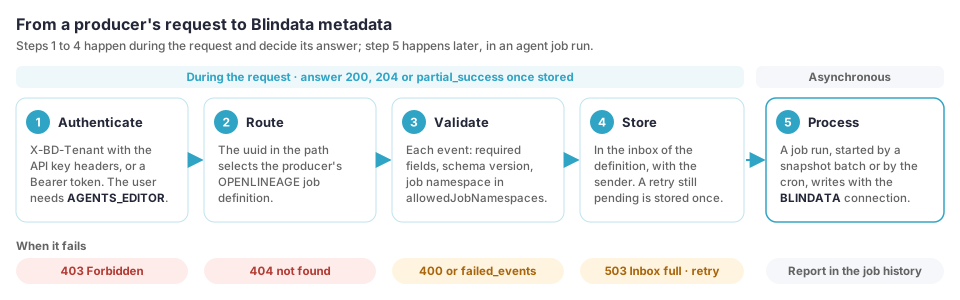
What you need
| Need | Why |
|---|---|
| A Blindata Agent that the producers can reach over HTTPS | The OpenLineage endpoint is hosted by the agent. |
An application user with AGENTS_EDITOR |
Sending events asks the agent to run a job, so the receiver checks the permission that runs agent jobs on every request. |
An agent job definition of type OPENLINEAGE for each producer |
It holds the producer’s configuration and its uuid is the producer’s address. |
A BLINDATA connection on the agent |
Every write to Blindata uses it, so a live (non dry-run) definition needs one. See Who writes to Blindata . |
Agent reachability
Producers push to the agent, so the agent address must be reachable from where they run. Typical choices, from the narrowest:
- Inside your network: Spark, Airflow, Trino and Flink clusters that already reach the agent.
- A self-hosted CI runner in the agent’s network, for pipelines that publish events from a repository.
- An exposed agent ingress, over HTTPS only.
- An agent hosted for you.
Exposing the agent widens its attack surface: use TLS, and give producers only the application user described below. The endpoint requires a tenant header and AGENTS_EDITOR on every request, and it limits the size of a request body (see Request format
).
The Blindata user of the producers
Create an application user
with API access enabled and give it the permission AGENTS_EDITOR, the same permission that runs agent jobs. Producers sign in with its user name and API key, as described in API key authentication
. A caller without it gets 403.
AGENTS_EDITOR lets the user send events, and also create, edit and run any agent job definition of the tenant. Give the user to producers only, and keep its API key in a secret store. The user does not need any permission to write metadata: the job writes with its own connection, described next.
Who writes to Blindata
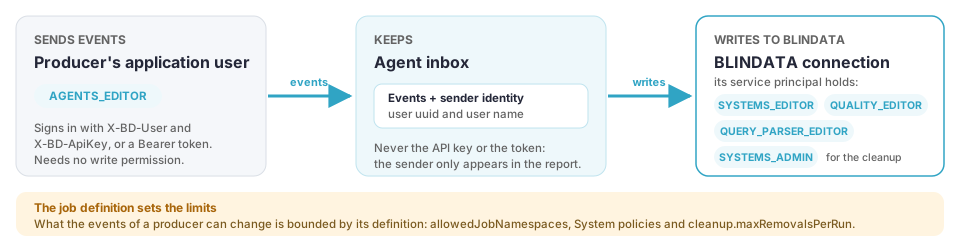
Every write of a job run (Systems, entities, fields, documents, data flows, routines, quality and profiling metrics, and the cleanup
) uses the job’s BLINDATA connection, named by outputOptions.targetConnectionName, whatever producer sent the events. The connection’s service principal holds the Blindata permissions:
| To write | Permission of the connection’s user |
|---|---|
| Systems, entities and fields | SYSTEMS_EDITOR |
| Quality checks and results | QUALITY_EDITOR |
| Profiling metrics | The permissions to upload profiling metrics |
| Jobs with SQL (routines and their analysis) | QUERY_PARSER_EDITOR |
| The cleanup | SYSTEMS_ADMIN |
When Blindata answers 403 to the cleanup, nothing is deleted and the run ends with a warning (CLEANUP_PERMISSION_DENIED). See the permissions list
.
The agent records who sent each event, as identity only: the Blindata user uuid of the caller and its user name (X-BD-User, or the uuid when the request carries a Bearer token). The run report counts the events of each sender. The agent never stores the sender’s API key or token, and the sender’s own permissions are not used to write.
What a producer’s events can change is bounded by its job definition: its allowedJobNamespaces, its System policies
and its removal cap (cleanup.maxRemovalsPerRun). Keep them tight, because the connection’s service principal writes for every producer of the definition.
The events stay on the agent, per tenant, until they are processed. Keep the agent’s database protected like any other agent data.
Create the job definition
Each producer addresses its own job definition by uuid, so mapping rules, System policies, snapshot mode, allowed job namespaces, dry run and quality options are tailored per producer and scenario. A producer sharing a definition with another shares all its rules.
- Open the agent, go to Schedules (see How to Schedule Jobs
), and create a schedule with job type
OPENLINEAGE. - Paste the job configuration. The only required key is
allowedJobNamespaces. Start with the defaults, which make the job a dry run: see Configure the OpenLineage job . - Set the cron expression. For a
BATCH_SNAPSHOTdefinition it is a safety net, see When events are processed . - Save, and copy the uuid of the schedule. The agent API lists the definitions with their uuids at
/agent-api/v1/jobs/schedules(permissionAGENTS_VIEWER).
The endpoint
The address of a producer is the agent address, the path of the OpenLineage receiver, and the uuid of its job definition:
https://<agent>/agent-api/v1/openlineage/{jobDefinitionUuid}/api/v1/lineage
https://<agent>/agent-api/v1/openlineage/{jobDefinitionUuid}/api/v1/lineage/batch
The two paths are the operations of the OpenLineage HTTP API, POST /lineage (one event) and POST /lineage/batch (an array of events), version 2.0.2 of the OpenAPI event schema specification published with OpenLineage 1.55.0. The tail api/v1/lineage is the default endpoint of the OpenLineage clients.
| Item | Value |
|---|---|
| Event schema | https://openlineage.io/spec/2-0-2/OpenLineage.json. Events whose schemaURL has major version 2 are accepted, major version 1 is accepted on a best-effort basis, a newer major version is rejected as non-retriable. |
| Event kinds | RunEvent, JobEvent and DatasetEvent. |
| Unknown job definition | 404 with OpenLineage job definition not found: <uuid>. The same answer for a definition that is not of type OPENLINEAGE. |
Tip
How to put this address in a client is not obvious: some clients ignore the default endpoint when the URL has a path, and one drops the last segment of the path. The settings that work in every client are in Configure your producers
.
Authentication
Send three headers with every request. In an OpenLineage client they are the custom headers of the HTTP transport.
| Header | Value |
|---|---|
X-BD-Tenant |
The uuid of your Blindata tenant. It selects the tenant of the request. |
X-BD-User |
The user name of the application user. |
X-BD-ApiKey |
The API key of the application user. |
The user needs AGENTS_EDITOR. A caller that already holds a Blindata Bearer token can send it in Authorization instead of X-BD-User and X-BD-ApiKey, together with X-BD-Tenant; the API key headers are the practical choice for clients and pipelines, because they do not expire.
Why the clients’ own authentication options do not work. The OpenLineage clients offer api_key (a static Authorization: Bearer token), jwt and oauth2 (client credentials against a token endpoint). Their tokens are not Blindata tokens, and the receiver does not accept them: oauth2 would need client credentials issued by the Blindata OAuth server. Use custom_headers (or headers, depending on the client). A managed integration that does not allow custom headers cannot send events to this endpoint.
Request format
- Body: JSON. A request to
/lineagecarries one event (an object), a request to/lineage/batchan array of events. - gzip:
Content-Encoding: gzipis accepted. Setcompression: gzipin the client, which is worth doing for large batches. - Size limit: 50 MB, measured on the received body and again on the decompressed body. A larger request is rejected with
400andRequest body too large. Split a large batch only if you do not need it as a snapshot : a snapshot is a single request. - Content type: any.
Answers to /lineage
| Status | When | Message |
|---|---|---|
200 |
The event is stored. | none |
400 |
The body is not valid JSON or gzip, is too large, is not one JSON object, or the event is rejected. | Request body is not valid JSON, Request body is not valid gzip, Request body too large, Single event endpoint expects one JSON object, or the reason below |
403 |
The user lacks AGENTS_EDITOR. |
|
404 |
Unknown job definition. | OpenLineage job definition not found: <uuid> |
503 |
The inbox of the definition is full: retry later. | Inbox full |
Answers to /lineage/batch
| Status | When |
|---|---|
204, no body |
Every event is stored. |
200 with a body |
At least one event is rejected. The valid ones are stored. |
400, 403, 404 |
As above. A body that is not an array gives Batch body must be a JSON array. |
The body of a 200 follows the OpenLineage specification:
{
  "status": "partial_success",
  "summary": {
    "received": 2,
    "successful": 1,
    "failed": 1,
    "retriable": 0,
    "non_retriable": 1
  },
  "failed_events": [
    {
      "index": 1,
      "reason": "Missing required field: eventTime",
      "retriable": false
    }
  ]
}
A client or a pipeline step should fail on any non-2xx answer and on any failed_events. The reasons are:
| Reason | Retriable | Meaning |
|---|---|---|
Missing required field: <field> |
❌ No | eventTime, producer and schemaURL are required. A run or job event needs job.namespace and job.name, a dataset event needs dataset. |
Unsupported event type |
❌ No | The event is not a run, job or dataset event. |
Unsupported schema version: <schemaURL> |
❌ No | The major version of the schema is not 1 or 2. |
Job namespace not allowed: <namespace> |
❌ No | The job namespace matches none of the allowedJobNamespaces of the definition, or contains |. Dataset events are not checked. |
Job namespace too long |
❌ No | The job namespace has more than 200 characters. |
Inbox full |
🔁 Yes | The definition has too many unprocessed events. A full inbox rejects the whole batch, so a snapshot is never stored in part. |
Retries are safe. If a client sends again an event, or a whole batch, that is still waiting to be processed (for example after a timeout that lost the answer), the agent answers as if it were new but does not store a second copy. A batch counts as a repeat only as a whole, so a snapshot is never stored in part. An event sent again after it was processed is processed again, which does not change the result.
A batch with a rejected event is not a snapshot. Its valid events are stored and processed, but they only describe themselves: nothing is deleted because it is missing from that batch. See Removal of deprecated metadata .
When events are processed
Receiving and processing are separate. The receiver validates each event and stores it on the agent. An agent job run turns the stored events into metadata.
| Snapshot mode | What triggers a run |
|---|---|
BATCH_SNAPSHOT |
A batch of valid events sent to /lineage/batch starts an asynchronous run of that definition. The cron schedule of the definition is a safety net. |
ADDITIVE |
The cron schedule of the definition. A run reads what has arrived since the last one. |
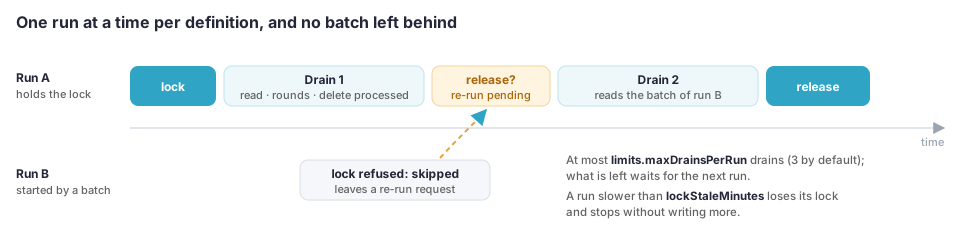
Good to know:
- One run at a time per definition. A run that starts while another run of the same definition is in progress is skipped, but it asks the running one to read the inbox again before it ends (at most
limits.maxDrainsPerRuntimes, 3 by default). A batch that arrives during a run is therefore processed by that run. Keep a cron schedule on aBATCH_SNAPSHOTdefinition anyway, as a safety net if the agent stops between receiving a batch and starting its run. - Events are deleted after processing. A run that ends without error, with a warning or not, deletes the events it processed. A run that ends in error (Blindata unreachable, for example) keeps them for the next run, and so does a run that had to discard a row of its upload. Events of a run that has no terminal event yet also stay, until it ends.
- Old events are dropped. Events older than
limits.maxEventAgeDays(7 by default) are deleted with a warning, and a definition accepts at mostlimits.maxPendingEvents(100,000) unprocessed events. - A dry-run definition also discards its events after processing. To validate a pull request without publishing, use a definition of its own with
dryRuntrue, and read the report in the agent job history.
Check your setup
- Create the definition with the default configuration, adding only
allowedJobNamespaces. - Send one event with
curl(see Send a batch with curl ) and check for204. - For a
BATCH_SNAPSHOTdefinition, or after the cron time, open the Runs tab of the agent and read the report of the run: events read and processed, systems resolved, gaps and, in a dry run, what would be created.
| Symptom | Likely cause |
|---|---|
404 |
Wrong uuid, or the definition is not of type OPENLINEAGE. |
403 |
The user lacks AGENTS_EDITOR, or the X-BD-* headers are missing. |
200 with Job namespace not allowed |
The allowedJobNamespaces of the definition do not match the job namespace of the event. |
200 with Unsupported schema version |
The schemaURL of the event does not name version 1 or 2 of the OpenLineage spec. |
503 Inbox full |
The definition is not being processed (check its schedule and the last runs) or the producer is faster than the job. |
| Nothing in Blindata | The definition is still a dry run (outputOptions.dryRun is true by default), or the run failed: read its error in the Runs tab (a missing permission of the BLINDATA connection, for example). |