How-to guides
Step-by-step guides for the common OpenLineage scenarios: lineage from a code repository with an AI assistant and a CI pipeline, runtime lineage from Airflow, Spark or dbt, quality results and metrics, connecting events to the crawled catalog, storage shared by several producers, and checking a first run
Each guide below is a short recipe for one scenario: what to configure, in which order, and how to check the result. They assume the endpoint is set up .
| I want to | Guide |
|---|---|
| Publish the lineage of a code repository, written with an AI assistant and kept under version control | Lineage from a code repository |
| Collect the lineage of what actually runs in Airflow, Spark or dbt | Runtime lineage |
| See test results and data metrics in Blindata data quality | Quality results and metrics |
| Attach the events to the tables I already crawl | Connect to the crawled catalog |
| Let several producers write the same bucket or database | Share a storage |
| Check what a run did, and why something is missing | Check a run |
Publish lineage from a code repository
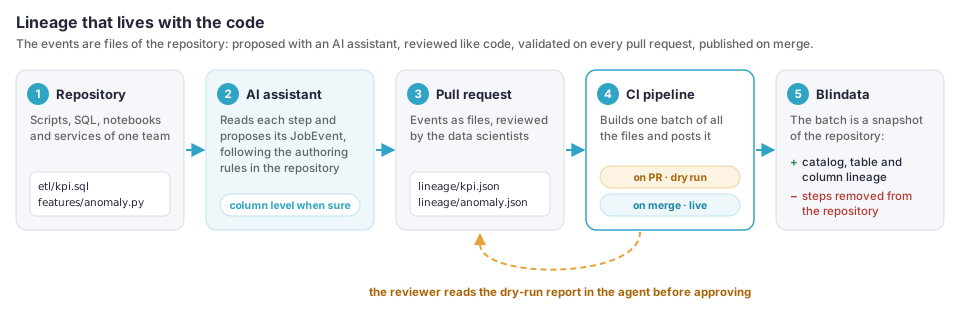
Use this guide when your transformations run as code that no OpenLineage integration observes: Python services, Lambda functions, Glue jobs, notebooks, SQL scripts. Instead of instrumenting every runtime, the repository describes its own lineage: one OpenLineage event per step, kept as a JSON file next to the code.
How it works, in short
- An AI assistant reads the code and writes the events, following a skill you add to the repository.
- The team reviews the events in the same pull request as the code.
- A CI pipeline sends all the events of the repository to Blindata when the pull request is merged.
- Blindata publishes the catalog and the lineage, and removes what the repository no longer describes.
What you get: the jobs of the repository as catalog entities, table lineage for every step, and column lineage wherever the code makes it traceable. Blindata follows the repository: a step deleted from the code disappears from Blindata at the next merge.
What you need
- The endpoint set up
: an agent that the CI runners can reach, an application user with
AGENTS_EDITOR, and aBLINDATAconnection on the agent. - A CI system. The example uses GitHub Actions; the same steps work in GitLab CI, Azure Pipelines or Jenkins.
- An AI coding assistant that supports skills or repository instructions (Claude Code, GitHub Copilot, Cursor or the one your team uses). Without one, the same rules work by hand.
Step 1: create the job definitions
Create a live definition for the repository: in the agent, a schedule of type OPENLINEAGE (see Create the job definition
) with this configuration:
{
  "snapshotMode": "BATCH_SNAPSHOT",
  "allowedJobNamespaces": ["github://my-org/ds-quality"],
  "systemPolicies": [
    { "match": "redshift://*", "creation": "NEVER", "entityCreation": false, "cleanupMode": "NONE" },
    { "match": "s3://*", "creation": "IF_MISSING", "technology": "Amazon S3", "entityCreation": true, "cleanupMode": "DAYS", "cleanupDays": 30 }
  ],
  "quality": { "enabled": false },
  "cleanup": { "enabled": true, "maxRemovalsPerRun": 50 },
  "outputOptions": { "dryRun": false, "targetConnectionName": "blindata-prod" }
}
| Setting | What it does |
|---|---|
BATCH_SNAPSHOT |
Each publication describes the whole repository: what it no longer contains is removed in the same run. |
One namespace, no * |
The repository owns its namespace: no other producer can describe or remove its jobs. |
redshift://* with NEVER |
The warehouse is crawled: the events only add lineage to existing tables. See Connect the events to your crawled catalog . |
s3://* with IF_MISSING |
Each bucket gets a System, created on first use. Use cleanupMode CUTOFF only for buckets that only this repository writes. |
quality.enabled false |
Design-time events carry no test results. |
A low maxRemovalsPerRun |
A broken or truncated batch cannot remove much: over the cap nothing is removed and the run warns. |
Add a daily cron expression as a safety net; a batch already starts a run.
To check pull requests before they are merged, create a second definition with the same configuration, "allowedJobNamespaces": ["github://my-org/*"] and no outputOptions. It is a dry run: it writes nothing and reports what a real run would do. One is enough for all repositories.
Copy the uuid of each definition.
Step 2: add the lineage skill to the repository
The skill tells the assistant how to describe the repository: what a step is, how to name jobs and datasets, and, above all, to reach column-level lineage wherever the code allows it, not just to say which tables a process reads and writes.
Save the text below in the repository where your assistant reads it:
| Assistant | File |
|---|---|
| Claude Code | .claude/skills/openlineage-lineage/SKILL.md |
| GitHub Copilot | .github/instructions/openlineage-lineage.instructions.md, with applyTo: "**" |
| Cursor | .cursor/rules/openlineage-lineage.mdc |
| Others | AGENTS.md, or the instructions file your assistant reads |
Replace my-org/ds-quality and the dataset naming table with the values of your repository.
---
name: openlineage-lineage
description: Writes and updates the OpenLineage JobEvent files in lineage/ that describe how this repository moves data, at column level wherever the code allows it. Use when asked to document, generate, update or check data lineage, or when a change adds, removes or modifies a step that reads or writes a dataset.
---

# OpenLineage lineage of this repository

You describe how the code of this repository moves data, as OpenLineage JobEvents
that Blindata publishes as catalog and lineage. Your goal is the **most precise
lineage the code proves**: column to column wherever you can trace it, table to
table only where you cannot. A description of the overall process is not enough.

## What a step is

A step is a unit of code that writes a dataset: a script, a function, a SQL
statement or file, a notebook, a dbt model, a Glue or Lambda handler. Each step
is one JobEvent in one file: `lineage/<job name>.json`.

- Job namespace: `github://my-org/ds-quality`, the same in every file.
- Job name: `<module>.<function>` or `<pipeline>.<step>`. Keep it stable:
  renaming it removes the old job in Blindata and creates a new one.
- A step that only reads (a report, an API response, a log) is not a step.
  Search indexes, model endpoints and caches are not datasets.

## Datasets

Name every dataset as OpenLineage does:

| Store | Namespace | Name |
| --- | --- | --- |
| Redshift | `redshift://<cluster>.<region>:<port>` | `<database>.<schema>.<table>` |
| PostgreSQL | `postgres://<host>:<port>` | `<database>.<schema>.<table>` |
| S3 | `s3://<bucket>` | the key of the dataset folder, without partitions and file names |
| Glue Data Catalog | `arn:aws:glue:<region>:<account>` | `table/<database>/<table>` |
| Athena | `awsathena://athena.<region>.amazonaws.com` | `<catalog>.<database>.<table>` |

Resolve names to their real values: follow constants, configuration files,
environment variables and infrastructure code (Terraform, CDK, CloudFormation,
serverless.yml). Use the production values. If a name cannot be resolved, do not
guess it: leave the dataset out and report it.

## How to reach column lineage

For each step, use the first approach that applies.

1. **The step writes with SQL** and the statement is known, or can be rebuilt
   because its template parameters are known: put the statement, as executed,
   in the `sql` job facet with its `dialect`, and list `inputs` and `outputs`.
   Do not add field mappings: Blindata parses the SQL and derives the column
   lineage. Expand templates (Jinja, f-strings, format) into the final SQL.
   A step that runs several writing statements becomes one job per statement.

2. **The step transforms data in code** (pandas, PySpark DataFrames, dicts,
   ORM objects): trace every output column back to its input columns and write
   the `lineage` job facet, one entry per output dataset, with `fields`:
   - Follow the data through the whole step: reads, renames, selects, computed
     columns, joins, aggregations, filters, writes.
   - When the code reads with a SQL query and then transforms the result, the
     query does not write the output: do not use the `sql` facet. Trace each
     output column through the code and the query back to the source table
     columns, and write the result in `fields`.
   - Set `transformations` on each input field:
     - `DIRECT` / `IDENTITY`: copied or renamed.
     - `DIRECT` / `TRANSFORMATION`: computed from the input; add a short
       `description` of the formula.
     - `DIRECT` / `AGGREGATION`: sum, count, average and similar.
   - Columns that influence the result without flowing into it (join keys,
     filters, group by, sort, window, conditions) go in the `inputs` of the
     entry, with their `field` and an `INDIRECT` transformation of subtype
     `JOIN`, `FILTER`, `GROUP_BY`, `SORT`, `WINDOW` or `CONDITIONAL`.
   - A pass-through (`select *`, a DataFrame written as read) is expanded
     column by column when the input schema is known from DDL, models, schema
     files or the catalog.

3. **Only when no column can be traced** (opaque libraries, schemas built at
   runtime), declare the table flow alone: the entry with its `inputs` and no
   `fields`. Report why.

Every mapping must point to code you can cite. A guessed mapping is worse than
none: when unsure, leave the field out and report it.

## Schemas and descriptions

- Each output carries the `schema` dataset facet with the columns the code
  writes, their types and order. Nested structures are nested `fields`.
- The job carries a `documentation` facet: what the step does and why, in one
  or two sentences for a business reader.
- Do not describe inputs that this repository does not write: the catalog
  already has them.

## Format

- One JobEvent per file, with `producer` and `schemaURL`
  (`https://openlineage.io/spec/2-0-2/OpenLineage.json#/$defs/JobEvent`).
- Every facet has `_producer` and `_schemaURL`. Use the facet versions of
  OpenLineage 1.55.0.
- Add a `jobType` facet: `processingType` `BATCH` or `STREAMING`, the
  `integration` (for example `ECS`, `LAMBDA`, `GLUE`), `jobType` `TASK`.
- Do not write `eventTime` or `sourceCodeLocation`: the pipeline adds them.
- Never write secrets, credentials, connection strings with passwords, or
  personal data.

## When the code changes

- Update the file of each step the change touches, in the same pull request.
- A step deleted from the code: delete its file.
- Keep job names as they are unless the step really became another one.

## Your report

End with a table: step, file, lineage level reached (`column`, `partial
column`, `table`), and what you could not resolve or left out, with the file
and line that caused it. These are the points the reviewer checks first.
Step 3: generate and review the events
Ask the assistant to describe one area at a time, for example: “Describe the lineage of features/”. It writes the files under lineage/ and ends with its report.
Review the files like code, in the same pull request as the code they describe:
- Every dataset name matches the real table or folder: compare it with the catalog in Blindata.
- Every field mapping can be found in the code.
- SQL steps carry the SQL as executed, not a simplified version.
- What the report lists as unresolved is either fixed or accepted.
- No secret, connection string or personal data in any file.
Two complete events, a SQL step and a code step with field mappings and nested fields, are in Send a batch with curl . The facets and their versions are in the Facet support reference .
Step 4: add the CI pipeline
The pipeline sends all the files of lineage/ as one batch: only a complete batch, sent in one request, is a snapshot.
| When | Sends to | Result |
|---|---|---|
A pull request changes lineage/ |
The dry-run definition | A report in the agent; nothing written. |
The default branch changes lineage/ |
The live definition | Catalog and lineage published; steps no longer described removed. |
Store these values as CI secrets and variables:
| Name | Kind | Value |
|---|---|---|
BLINDATA_TENANT |
secret | The tenant uuid. |
BLINDATA_USER |
secret | The user name of the application user. |
BLINDATA_API_KEY |
secret | Its API key. |
OPENLINEAGE_AGENT_URL |
variable | https://<agent-host> |
OPENLINEAGE_DRY_RUN_UUID |
variable | The uuid of the dry-run definition. |
OPENLINEAGE_LIVE_UUID |
variable | The uuid of the live definition. |
.github/workflows/lineage.yml:
name: Lineage
on:
  pull_request:
    paths: ["lineage/**"]
  push:
    branches: [main]
    paths: ["lineage/**"]

jobs:
  publish:
    # A runner that reaches the agent, for example a self-hosted runner in its network.
    runs-on: self-hosted
    steps:
      - uses: actions/checkout@v4

      - name: Build the batch
        run: |
          jq -s \
            --arg now "$(date -u +%Y-%m-%dT%H:%M:%SZ)" \
            --arg repo "${{ github.server_url }}/${{ github.repository }}" \
            --arg sha "${{ github.sha }}" \
            'map(
               .eventTime = $now
               | .job.facets.sourceCodeLocation = ({
                   "_producer": "https://github.com/my-org/lineage-pipeline/v1",
                   "_schemaURL": "https://openlineage.io/spec/facets/1-1-0/SourceCodeLocationJobFacet.json#/$defs/SourceCodeLocationJobFacet",
                   "type": "git", "url": $repo, "repoUrl": $repo, "version": $sha
                 } + (.job.facets.sourceCodeLocation // {}))
             )' lineage/*.json > batch.json
          echo "Events in the batch: $(jq length batch.json)"

      - name: Send the batch
        env:
          TENANT: ${{ secrets.BLINDATA_TENANT }}
          USER_NAME: ${{ secrets.BLINDATA_USER }}
          API_KEY: ${{ secrets.BLINDATA_API_KEY }}
          AGENT: ${{ vars.OPENLINEAGE_AGENT_URL }}
          UUID: ${{ github.event_name == 'pull_request' && vars.OPENLINEAGE_DRY_RUN_UUID || vars.OPENLINEAGE_LIVE_UUID }}
        run: |
          status=$(gzip -c batch.json | curl -sS -o response.json -w '%{http_code}' -X POST \
            "$AGENT/agent-api/v1/openlineage/$UUID/api/v1/lineage/batch" \
            -H "Content-Type: application/json" -H "Content-Encoding: gzip" \
            -H "X-BD-Tenant: $TENANT" -H "X-BD-User: $USER_NAME" -H "X-BD-ApiKey: $API_KEY" \
            --data-binary @-)
          echo "HTTP $status"
          if [ "$status" != "204" ]; then cat response.json; exit 1; fi
- The job fails on any answer but
204. A200lists the rejected events infailed_events, and a batch with a rejected event is not a snapshot: nothing would be removed by it. jq -sturns the files into the array of the batch, and adds the time and the commit. Apathwritten in a file is kept.- Pull requests from forks get no secrets in GitHub Actions: run the check only for branches of the repository.
- A batch is limited to 50 MB once decompressed, thousands of events. Split a large repository into several namespaces, each with its own definition, long before that.
Step 5: check the result
- Open a pull request with the first files. In the agent, open the Runs of the dry-run definition and read the report: Systems resolved and created, flows planned, and gaps.
UNMAPPED_NAMESPACEmeans a dataset namespace matches no System: stamp the System or fix the name. See Why is my lineage missing? . - Merge. The live definition publishes, and its report says what was written.
- In Blindata, open an output table and its lineage: the flows name the job (
@github://my-org/ds-quality/<job name>), and the job entity on the OpenLineage System links to the repository. - Later, delete a step and its file. After the merge, its job, its flows and its routine are removed in the same run. See Removal of deprecated metadata .
Variants
| Situation | Change |
|---|---|
| A step also runs with the OpenLineage Spark integration | Keep the runtime events in their own ADDITIVE definition with another job namespace, see Runtime lineage
. |
| Several repositories write the same bucket | cleanupMode DAYS for that bucket in every repository, see Share a storage between producers
. |
| The repository is large | One namespace and one definition per area, each sending its own complete batch. |
| No AI assistant | Follow the skill by hand, starting from the two events of Send a batch with curl . |
Collect runtime lineage from Airflow, Spark or dbt
Runtime integrations emit events while jobs run. Each run describes only what it did, so the definition adds what it receives and removes, after a number of days, what is no longer seen.
1. Choose the job namespace of the producer, for example airflow-prod. It is set in the producer:
| Producer | Where the namespace is set |
|---|---|
| Airflow | the namespace option of the OpenLineage provider |
| Spark | spark.openlineage.namespace |
dbt (dbt-ol) |
the OPENLINEAGE_NAMESPACE environment variable |
| Trino | openlineage-event-listener.namespace |
Use one namespace per environment (airflow-prod, airflow-test) and one definition per namespace, so test runs never reach production metadata.
2. Create the definition in the agent, with a cron expression that runs it often enough for your users, for example every 15 minutes:
{
  "snapshotMode": "ADDITIVE",
  "allowedJobNamespaces": ["airflow-prod"],
  "cleanup": { "enabled": true, "staleJobDays": 30 },
  "outputOptions": { "dryRun": false, "targetConnectionName": "blindata-prod" }
}
- Nothing is created on crawled Systems by default: the events add lineage to the tables that exist.
staleJobDaysmust be longer than the interval of your slowest job: a monthly job needs more than 31 days, or it is removed between two runs.- Start with the dry run (leave
outputOptionsout), read a report, then go live.
3. Connect the namespaces of the datasets to the Systems you crawl: see Connect the events to your crawled catalog .
4. Configure the producer with the address and headers of the definition: Airflow , Spark , dbt , Flink , Trino .
5. Run one job, wait for the next run of the definition, and check it .
What to expect from each producer:
| Producer | Lineage | Good to know |
|---|---|---|
| Airflow | Table lineage of the operators that support OpenLineage, and the DAG task graph as orchestration flows | Operators without lineage extraction are reported as PRODUCER_NO_LINEAGE. |
| Spark | Table and column lineage from the query plans | A plan the integration could not fully handle is reported as PRODUCER_PARTIAL_LINEAGE. |
| dbt | Table lineage between models and sources | Each model is a job. When the event carries the SQL of the model, it is analyzed for column lineage. |
| Trino | Table lineage of write queries | Each query is a job by default: group them with the job name format, see Trino . |
When a completed run always describes the whole job (a job that reads and writes the same datasets every time), set lineageReplacement
to JOB: lineage the job no longer has is removed at its next run instead of after staleJobDays.
Bring quality results and metrics into Blindata
Quality results come from completed runs whose events carry the quality facets: assertions (dataQualityAssertions), tests (test) and metrics (dataQualityMetrics, inputStatistics, outputStatistics). Integrations such as Great Expectations emit them; your own checks can too.
1. Use a definition with quality on (the default) and the namespace of the producer:
{
  "snapshotMode": "ADDITIVE",
  "allowedJobNamespaces": ["quality-checks"],
  "quality": { "enabled": true, "metricsEnabled": true },
  "outputOptions": { "dryRun": false, "targetConnectionName": "blindata-prod" }
}
2. Make sure the checked datasets are in the catalog. A check is linked to the entity of its dataset: an assertion on a dataset that is not catalogued makes no check (TARGET_NOT_CATALOGUED). See Connect to the crawled catalog
.
3. Send the results. From your own code, one COMPLETE run event per check run is enough:
{
  "eventType": "COMPLETE",
  "eventTime": "2026-11-04T06:00:00Z",
  "producer": "https://github.com/my-org/quality-checks/v1",
  "schemaURL": "https://openlineage.io/spec/2-0-2/OpenLineage.json#/$defs/RunEvent",
  "run": { "runId": "0193a8e2-6c1f-7d2e-9b55-3f1d2a4c8e10" },
  "job": { "namespace": "quality-checks", "name": "daily_kpi_checks" },
  "inputs": [ {
    "namespace": "redshift://my-dwh.eu-west-1:5439",
    "name": "dwh.analytics.daily_kpi",
    "inputFacets": {
      "dataQualityAssertions": {
        "_producer": "https://github.com/my-org/quality-checks/v1",
        "_schemaURL": "https://openlineage.io/spec/facets/1-1-0/DataQualityAssertionsDatasetFacet.json#/$defs/DataQualityAssertionsDatasetFacet",
        "assertions": [
          { "assertion": "not_null", "success": true, "column": "plant_id" },
          { "assertion": "avg_value_in_range", "success": false, "column": "avg_value" }
        ]
      },
      "dataQualityMetrics": {
        "_producer": "https://github.com/my-org/quality-checks/v1",
        "_schemaURL": "https://openlineage.io/spec/facets/1-0-3/DataQualityMetricsInputDatasetFacet.json#/$defs/DataQualityMetricsInputDatasetFacet",
        "rowCount": 18250,
        "columnMetrics": { "plant_id": { "nullCount": 0, "distinctCount": 50 } }
      }
    }
  } ],
  "outputs": []
}
Post it to /lineage of the definition, with the headers of Authentication
. Use a new runId for every run: results are published once per check and run, so a retried request does not duplicate them.
4. Look at the result in Blindata: the checks are in the quality suite openlineage:<job definition uuid>, one per dataset, assertion and column, with one result per run; the metrics are profiling records of the entity. See OpenLineage to Blindata quality
.
Connect the events to your crawled catalog
OpenLineage names a dataset by a namespace (where it is: redshift://my-dwh.eu-west-1:5439) and a name. Blindata needs to know which System a namespace is. Do it once per System, for every producer:
- Find the namespace. Run the definition once: datasets of an unknown namespace are reported as
UNMAPPED_NAMESPACE, and the run log names it:Namespace <namespace> maps to no System; <n> datasets skipped. - Stamp the System. In Blindata, open the System you crawl and add the additional property
openLineageNamespacewith the namespace as value. - Run again. The datasets resolve to the System, and the name gives the schema and the table, as the crawler names them. See Dataset name to schema and entity .
Prefer the stamp to the other options:
| Option | Use it when |
|---|---|
openLineageNamespace on the System |
Always, for crawled Systems: it holds for every producer and definition. |
namespaceMappings
in a definition |
One producer uses a namespace that others do not, or a pattern covers many namespaces. |
creation: IF_MISSING in a System policy
|
Stores that nobody crawls, such as S3 buckets: the job creates the System. |
Keep creation at NEVER for stores you crawl: a System created by the job next to the crawled one would split the catalog in two.
Share a storage between producers
Several producers often write the same bucket or database: two repositories writing one S3 bucket, or Airflow and Spark writing one warehouse. Each producer keeps its own definition and its own job namespace; the storage needs a cleanup rule that does not let one producer remove what another still describes.
| The storage is | cleanupMode in the System policy of every definition that writes it |
|---|---|
| Crawled (a warehouse, a database) | NONE, the default: the crawler owns its tables. |
| Written by one producer only | CUTOFF: a snapshot removes what it no longer describes, in the same run. |
| Written by several producers | DAYS, with cleanupDays longer than the slowest producer’s interval: an entity is removed only when nobody has described it for that long. |
The job protects you if you forget: a System created by another definition, or by none, is never cleaned with CUTOFF, and the run reports SHARED_SYSTEM_DOWNGRADED. See Ownership of dataset Systems
.
Check a run
Every run of a definition leaves a report in the agent: open the definition in Schedules and its Runs.
- Events:
readandprocessed. Fewer processed than read means runs still waiting for their end event, or uploads that failed: the events stay for the next run. - Catalogue: Systems resolved and created, entities, fields, job entities. A created System you did not expect means a missing stamp (see above).
- Lineage: table, column and orchestration flows. No column flows for a SQL job in the first run is normal: its SQL is analyzed and the column flows follow (
QLP_PENDING). - Gaps: each code says what is missing and what to do. See Why is my lineage missing? .
- Cleanup: the mode, and the removals per object type. Over
maxRemovalsPerRunnothing is removed and the run warns. - Senders: who sent the events the run read.
A run in WARNING completed but logged something that changed the outcome (a gap, a skipped cleanup). A run in ERROR wrote nothing more after the failure, and its events stay for the next run. See Read the run report .