OpenLineage
Receive standard OpenLineage events from Airflow, Spark, dbt, Flink, Trino or your own code, and turn them into catalog, table and column lineage, quality results and metrics.
Capabilities
| Capability | Support | Notes |
|---|---|---|
| Tables, views & columns | Supported | Systems, tables, columns (nested fields with dot notation), descriptions and documentation from the datasets the events describe. Which objects are created is set per job. |
| Keys, constraints & indexes | Not available | |
| Procedures & functions | Supported | The SQL of each job (sql facet) is cataloged as a routine and analyzed for column lineage. |
| Data lineage | Supported | Table and column lineage from the events, orchestration flows between jobs, and removal of lineage that producers no longer describe. |
| Lineage from query history | Not available | |
| Business glossary links | Not available | |
| Data quality probes | Supported | Data quality assertions and tests become checks with results. The connector does not run probes. |
| Data profiling | Supported | Data quality metrics and run statistics become profiling metric records. |
| Data classification | Not available | |
| Chat with your data | Not available |
Overview
The OpenLineage connector lets any tool that speaks OpenLineage , the open standard for lineage metadata, describe its work to Blindata. Your orchestrators, processing engines, transformation tools, test runners and CI pipelines push standard OpenLineage events to the Blindata Agent, and Blindata turns them into catalog entries, table and column lineage, quality results and metrics, and keeps them current as your pipelines change.
Highlights
How it works
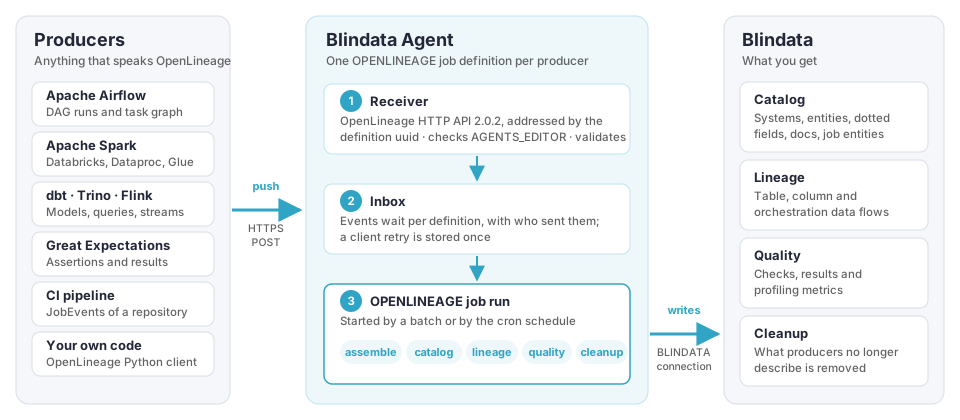
- Producers push events. A producer sends OpenLineage events over HTTPS to its own address on the Blindata Agent, signed in as a Blindata application user.
- The agent receives them. It checks them against the producer’s job definition and keeps them until they are processed. A retried request is not stored twice.
- An agent job processes them. A run, started by a batch of events or by a schedule, assembles the events and writes the result to Blindata with its own Blindata connection. Every run leaves a report in the agent job history.
Most Blindata connectors pull: a scheduled job reads a source system. This one is push: the producers decide when to describe what they did, and the agent only needs to be reachable by them.
What you get
| From the events | Catalog | Lineage | Quality | In Blindata |
|---|---|---|---|---|
| Datasets read and written | ✅ | ✅ | Systems, tables and columns, nested fields included, with descriptions and documentation | |
| Jobs and their SQL | ✅ | ✅ | One entity per job, and its SQL analyzed for column lineage | |
| Declared and observed lineage | ✅ | Table and column data flows, each naming the job that moves the data | ||
| Job dependencies and task graphs | ✅ | Orchestration flows between jobs | ||
| Assertions, tests and statistics | ✅ | Quality checks with results, and profiling metrics |
The details are in OpenLineage to Blindata catalog , OpenLineage to Blindata lineage , OpenLineage to Blindata quality and the Facet support reference .
Typical scenarios
| Scenario | Producers | How the definition works | How-to |
|---|---|---|---|
| Runtime lineage of what actually ran | Airflow, Spark, dbt, Trino, Flink | Events add up as jobs run; what is not described for a while is removed after a number of days. | Runtime lineage |
| Design-time lineage kept in version control | A CI pipeline publishing the events of a repository, written with an AI assistant | Each publication is a complete snapshot: what the repository no longer describes is removed in the same run. | Lineage from a code repository |
| Quality monitoring | Great Expectations, your own checks | Assertion and test results, and metrics, from every completed run. | Quality results and metrics |
Getting started
- Set up the endpoint : make the agent reachable, create the application user and a job definition per producer.
- Configure the job : decide which Systems may be created or mapped, and what may be removed. A new job starts as a dry run.
- Configure your producers
: the settings for the Python client, Spark, Airflow, dbt, Flink and Trino, and a
curlexample. - Follow the how-to guide of your scenario.
Good to know
- Producers must reach the agent. The endpoint is hosted by the Blindata Agent: producers outside its network need a way to reach it.
- HTTP with custom headers. Producers use the OpenLineage HTTP transport and sign in with custom headers. See Authentication .