
OpenLineage to Blindata catalog
How OpenLineage datasets, schemas, documentation, jobs and SQL appear in the Blindata catalog as Systems, entities, fields and routines
This page explains where each OpenLineage object lands in the Blindata catalog, so you know what to look for after a run.
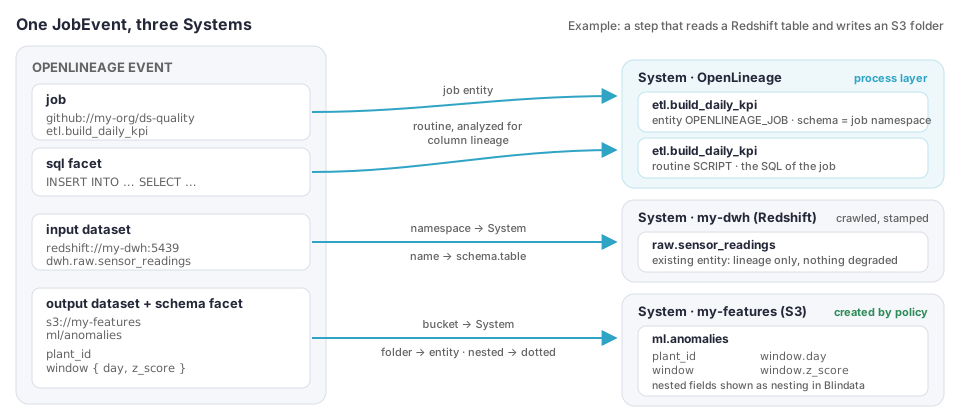
| OpenLineage | Blindata |
|---|---|
Dataset namespace |
A System (an existing one, or one created if the job’s policy allows it). One System per S3 bucket. |
Dataset name |
A physical entity with a schema and a name. |
schema facet |
Physical fields, with dot notation for nested fields. |
documentation facet, field descriptions |
The description, or the documentation when long. |
Job (namespace, name) |
A physical entity of type OPENLINEAGE_JOB on the job System of its namespace. |
Job sql facet |
A routine of the job System, analyzed for column lineage. |
Principles
- Physical identity first. A dataset lands on the same System, schema and name that a crawler of that store uses, so lineage connects to what you already catalog.
- Never degrade crawled metadata. The job does not remove or retype fields that a crawler created, and it does not overwrite a description that another job stored on an entity it did not create.
- Creating Systems is a decision of the job. By default nothing is created: a dataset whose namespace maps to no System is reported as
UNMAPPED_NAMESPACE.
Namespace to System
The namespace of a dataset (for example redshift://my-dwh.eu-west-1:5439 or s3://my-bucket) decides its System. The job tries, in order, and stops at the first that applies:
- Ignored namespace (
ignoredNamespaces): the dataset is skipped and counted asIGNORED_NAMESPACE. By defaultopensearch://*andelasticsearch://*. - Job-level mapping (
namespaceMappings): the first entry whose pattern matches and whose System exists. - A System stamped with the namespace: the System whose additional property
openLineageNamespaceequals the namespace. This is the tenant-wide way to say “this namespace is that System”. Add the property to the System you crawl, with the value used by the producers. If several Systems carry the same value, the one first by name is used. - Creation, if the first
systemPoliciesentry that matches the namespace hascreation: IF_MISSING. A System of the planned name that already exists is used and stamped instead of duplicated. - Otherwise the dataset is reported as
UNMAPPED_NAMESPACEand nothing is catalogued for it.
A System created by the job gets the policy’s subtype (DATABASE by default) and technology, and is stamped with openLineageNamespace and openLineageOwner (the uuid of the job definition that created it). The name comes from nameTemplate.
One System per S3 bucket
An S3 namespace is s3://<bucket>. Each bucket is its own System, named after the bucket by default, with technology Amazon S3. The folders of the bucket are the entities (see below).
Entities on created and crawled Systems
| Setting | Created by OpenLineage | Mapped or crawled |
|---|---|---|
entityCreation default |
true: entities and fields are created |
false: only entities that already exist get fields and lineage |
When entityCreation is false and the entity does not exist, no entity is created and the lineage to it is reported (TARGET_NOT_CATALOGUED).
Dataset name to schema and entity
The job decides the schema and the name of the entity from the first rule that applies:
-
hierarchyfacet: the last level is the entity, the level before it the schema. -
The profile of the namespace scheme:
Scheme Dataset name Schema Entity redshift://,postgres://database.schema.tableschematable. With no schema part,public.awsathena://catalog.database.tabledatabasetable. With no database part,default.arn:aws:gluetable/database/tabledatabasetable. With no database part,default.s3://The key of the dataset folder The key up to the parent of the dataset folder The dataset folder. Partition segments ( key=value) and files (part-…,_SUCCESS, names with an extension) are dropped from the end. -
A
symlinkstable identity, for a namespace whose scheme has no profile above: aTABLEsymlink is named by the same rules. -
Otherwise the name as it is, with no schema.
Other schemes need the hierarchy facet or a symlinks entry.
The datasetType facet sets the table type of an entity the job creates, and its subtype as a property. catalog, dataSource and storage (and ownership and tags) are stored as additional properties of the entity.
Fields
The schema facet gives the fields of an entity, with their type and position.
- Nested fields are dotted. A
structwindowwith the fieldsdayandz_scoregives the three fieldswindow,window.dayandwindow.z_score. Blindata shows dotted names as nesting. The same names are used by field lineage (window.z_score). - Order:
ordinal_positionwhen present, otherwise the position in a depth-first walk of the facet. - Fields are created when missing. Fields that a crawler created are never removed or retyped by the job.
- Fields are created only when the job may create entities of the System, or the entity exists.
Documentation
A documentation facet on a dataset or a job, and the description of a schema field, go to one of two places by length.
| Content | Where it goes |
|---|---|
| Plain text of 250 characters or fewer | The description of the entity. |
| Plain text of more than 250 characters, or any text whose content type is Markdown or HTML | The documentation of the entity, a Markdown document. |
Two protections keep people’s work:
- A description that another job stored is not replaced on an entity the job did not create. An empty description is never sent: crawled descriptions are not blanked.
- User-edited documentation is not replaced. The job writes the hash of the documentation it wrote in the entity property
openLineageDocumentationHash. When the stored document no longer matches it, a user edited it: the job keeps it and counts it indocumentsKeptUserEdited. This is configurable per System:replaceUserDocumentation: truein the policy lets the job overwrite it.
A description of a field longer than 250 characters is not sent (Blindata has no field documentation to receive it): it is counted in the run report.
Jobs
When processLayer is true (the default), each OpenLineage job becomes one entity on the job System of its namespace: the System that a jobSystems
rule chooses for the namespace, otherwise the OpenLineage System (named OpenLineage by default, SERVICE subtype, technology OpenLineage):
| Attribute | Value |
|---|---|
| Table type | OPENLINEAGE_JOB |
| Schema | The job namespace. |
| Name | The job name. |
| Description / documentation | From the job documentation facet, with the same 250-character rule. |
| Properties | openLineageJobScope (the job’s scope
), openLineageJobType, openLineageProcessingType, openLineageIntegration (from the jobType facet), the source code location (sourceCodeLocation), ownership, tags, and the properties of the producer’s facets (see Facet support reference
). |
Job entities are the ends of the orchestration flows
and the target of the checks created from test facets. Set processLayer to false to catalog only the datasets.
SQL and routines
A job with a sql facet gets one SCRIPT routine on its job System:
| Attribute | Value |
|---|---|
| Name | The job name. |
| Catalog and schema | The job namespace. |
| Code | The SQL of the facet. |
| Properties | openLineageSqlHash, openLineageSqlDialect. |
The routine is analyzed by Blindata SQL lineage, in a query bucket, only when its SQL changed. See OpenLineage to Blindata lineage .
Ignored content
Datasets that match ignoredNamespaces are accepted and counted, not catalogued. Facets the job does not know are counted by key in unknownFacets.
Re-sends and updates
Every run uploads again the entities, fields, routines and flows it describes, whether they changed or not: the upload refreshes the last update of each object, which is how the job tells what is still described. See Removal of deprecated metadata . Results are the same however many times the same events arrive.