Introduction
The Data Assets tab on a concept answers: which datasets in our catalog are about this business concept?
A concept in the Business Glossary is a shared name for something the business cares about. Defining it is only useful if you can also see where it appears in real data. This tab is that view: the tables, files, and other catalog assets connected to the concept — not every dataset in the catalog.
Those connections are not all the same. A dataset can be the concept: it is a list of that thing. It can be a narrower type of the concept: it is still that thing, but a more specific kind. Or it can only mention the concept, because one of its fields holds a property of it, not the thing itself.
The tab lists these in three groups, so you can tell a dataset of the concept from a specialized dataset, and both from a field that only stores one piece of information.
You create the connections from the catalog. This page explains how they appear on the concept once they exist. See Linking Catalog Assets to Business Glossary .
Direct mappings
Direct Mappings lists datasets that are this concept. Someone looked at a table, file, or other catalog asset and connected the asset as a whole to this business concept.
Example: you have a customers table. You link
that table to the Customer concept. On Customer, customers appears under Direct Mappings.
That is the strongest connection: the dataset is a list of that thing. A dataset linked to a different concept — even a more specific type of this one — does not appear here.
Sub-concept mappings
Sub-concept Mappings lists datasets that are a narrower type of this concept. The table was not linked here. It was linked to a more specific concept underneath.
Example: VIP Customer is a more specific kind of Customer. You link the vip_customers table to VIP Customer.
- On VIP Customer it appears under Direct Mappings: the table is VIP Customer.
- On Customer it appears under Sub-concept Mappings, labeled Mapped via VIP Customer.
Mapped via tells you why the dataset showed up. It is still about customers, and the label names the more specific type it was actually linked to. That name is a link back to that concept.
This only works upward. A table of VIP customers is a table of customers. A table of ordinary customers is not a table of VIP customers, so it does not appear on VIP Customer.
Field and attribute mappings
Field & Attribute Mappings lists datasets that only mention this concept. The table as a whole is not this concept. One of its columns is connected to a property of the concept — an attribute.
This is field-level semantic linking : you connect a column in the catalog to an attribute in the glossary, not the whole table to the concept.
Example: the orders table is about orders, not customers. Its email column holds the customer’s email. You link that column to the email attribute of Customer.
- On Customer,
ordersappears under Field & Attribute Mappings. It is not a customer table. It is a table that stores one piece of customer information.
You can be more precise in the link and say whose property it is:
- If you link
orders.emailto email and name Customer, the table appears on Customer with no Mapped via label: the column describes this concept’s own property. - If you link the same kind of column and name VIP Customer, the table still appears on Customer — Customer owns the email attribute — with Mapped via VIP Customer. It also appears on VIP Customer. It does not appear on other types of customer you did not name.
A column linked to a property that only the narrower concept has stays on that narrower concept. If loyalty tier exists only on VIP Customer, a column about loyalty tier is not evidence about Customer in general, so it does not appear on Customer.
When a table is already listed as Direct or Sub-concept for this concept, it stays in that group. Its columns do not add a second row here.
How assets are listed
A group appears only when it contains at least one asset.
On a given concept, an asset appears in one group only. A whole-table link to this concept wins. A whole-table link to a more specific concept wins over a column link. The same asset can still appear on several concepts, each time in the group that fits that concept.
Inside a group, assets that are outputs of a data product are gathered under that product. An asset published by two products is shown under both. Assets that are not an output of any data product are listed on their own.
The example
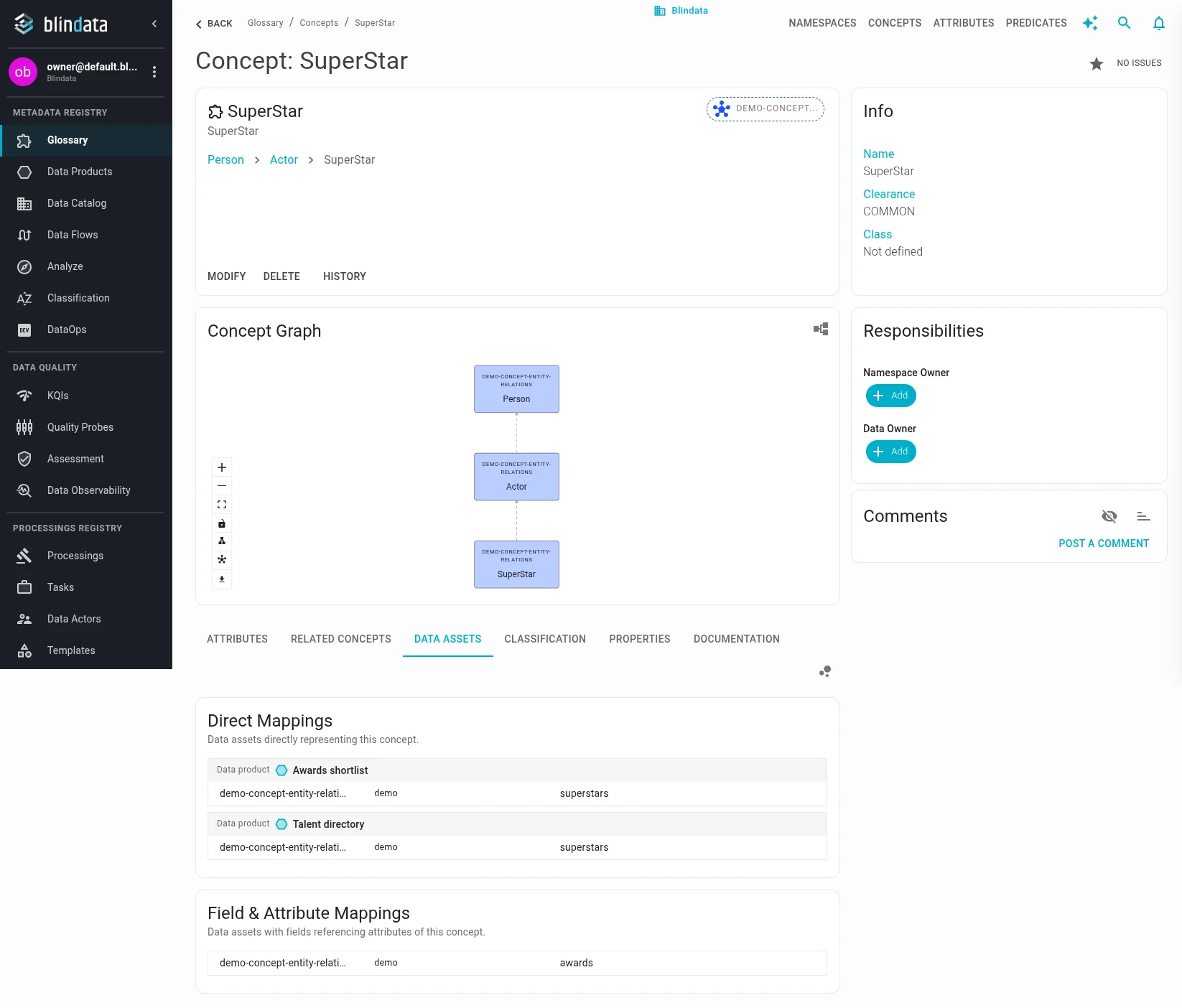
The screenshots below use one small glossary. Person is the general concept. Actor and Student are more specific kinds of person. SuperStar is a more specific kind of actor, and therefore also a kind of person.
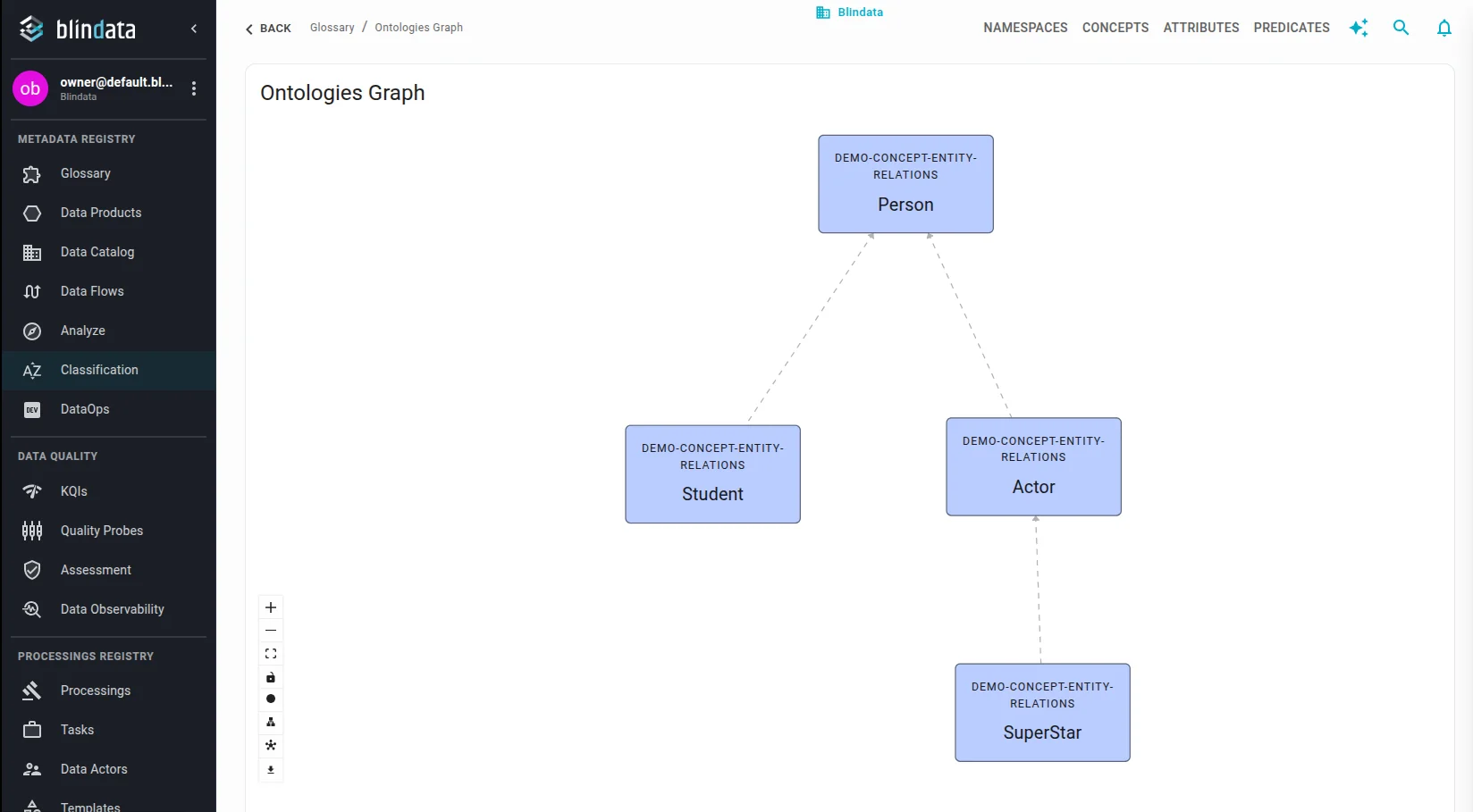
Two properties complete the scenario:
- email is defined on Person. Actor, Student, and SuperStar also have it, because each of them is a person.
- stage name is defined on Actor only. Person and Student do not have it. SuperStar has it, because a superstar is an actor.
These catalog assets were linked to that glossary:
| Asset | How it was linked |
|---|---|
people |
The table is Person |
actors |
The table is Actor. Output of the data product Talent directory |
students |
The table is Student |
superstars |
The table is SuperStar. Output of Talent directory and of Awards shortlist |
contacts |
The email column is Person’s email |
cast_contacts |
The email column is an Actor’s email (the attribute still belongs to Person) |
credits |
The stage_name column is Actor’s stage name |
awards |
The email column is a SuperStar’s email |
How the groups appear on Person
Person is the broadest concept, so its Data Assets tab shows all three groups.
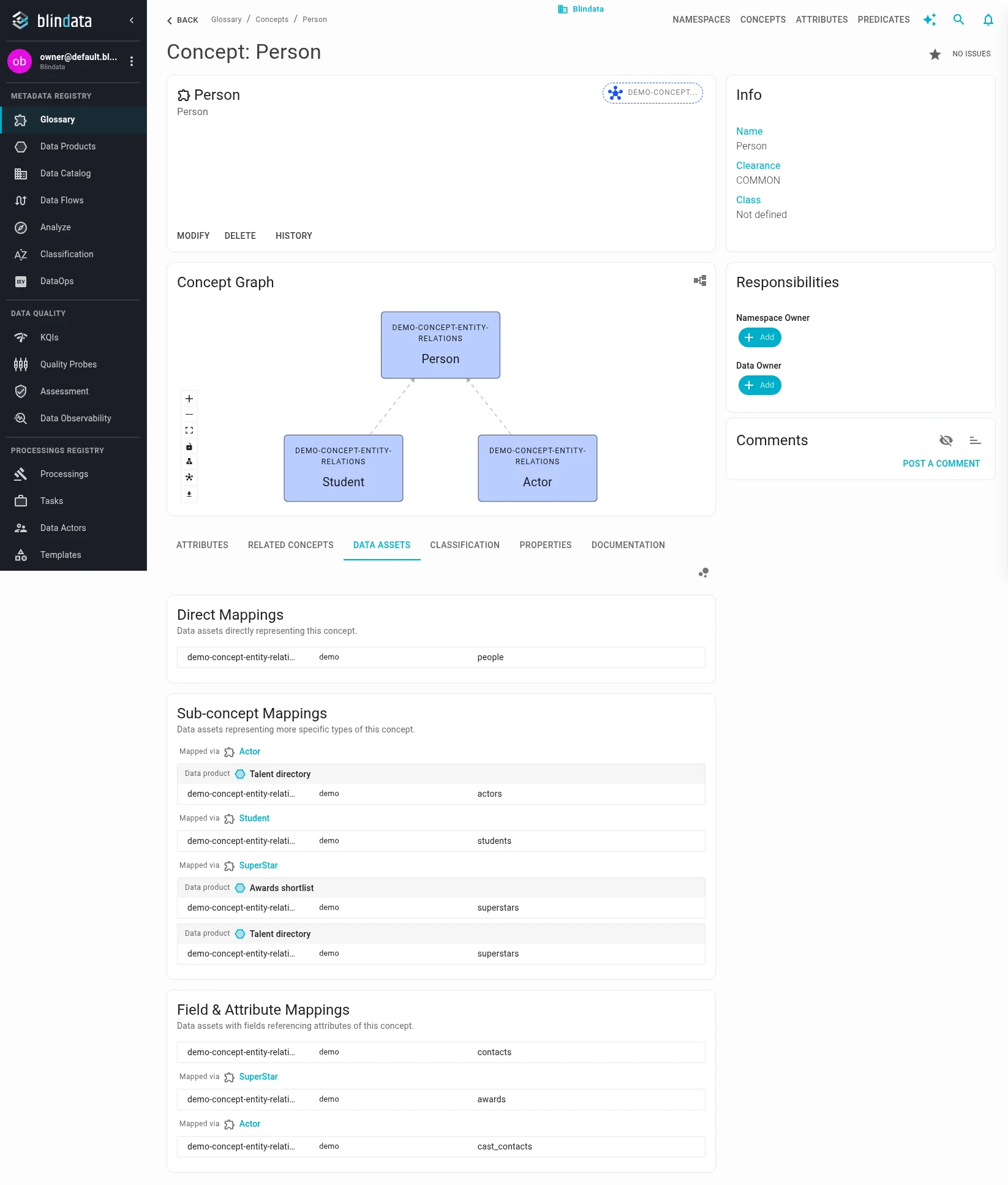
- Direct Mappings contains only
people. That table was linked to Person itself. - Sub-concept Mappings contains the tables linked to narrower types:
actorsMapped via Actor (under Talent directory),studentsMapped via Student (no data product), andsuperstarsMapped via SuperStar (once under Awards shortlist, once under Talent directory, because two products publish it). - Field & Attribute Mappings contains tables that only contribute an email column:
contacts(Person’s own email),awardsMapped via SuperStar, andcast_contactsMapped via Actor.creditsis not here: stage name is not a property of Person.
How the groups appear on Actor, Student, and SuperStar
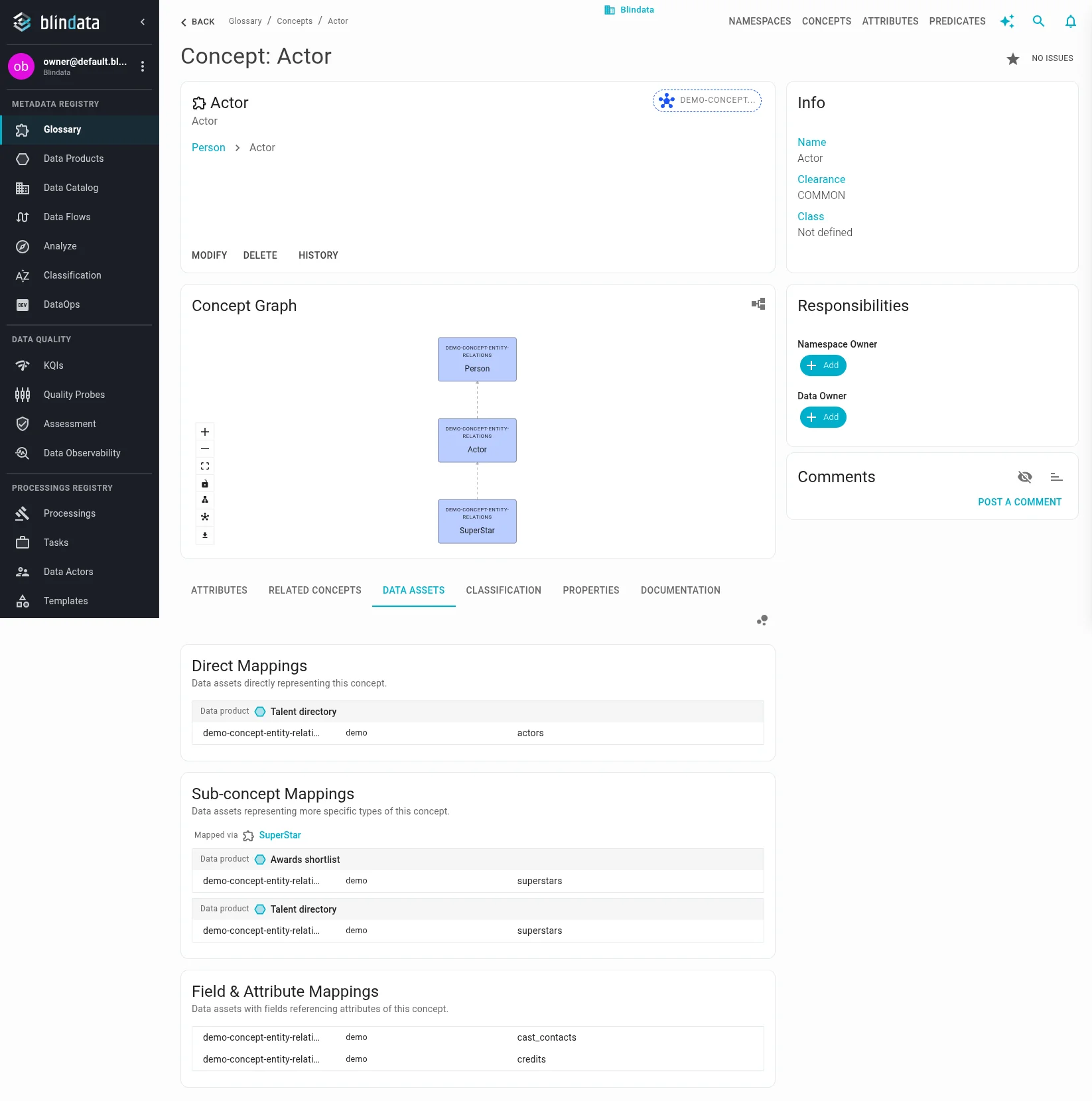
Actor sits in the middle of the hierarchy. It shows actors directly, superstars as a narrower type, and columns described as an actor’s property (cast_contacts for email, credits for stage name). Student tables stay on Student and on Person. awards is not here: that email column names SuperStar, and Actor does not own email.
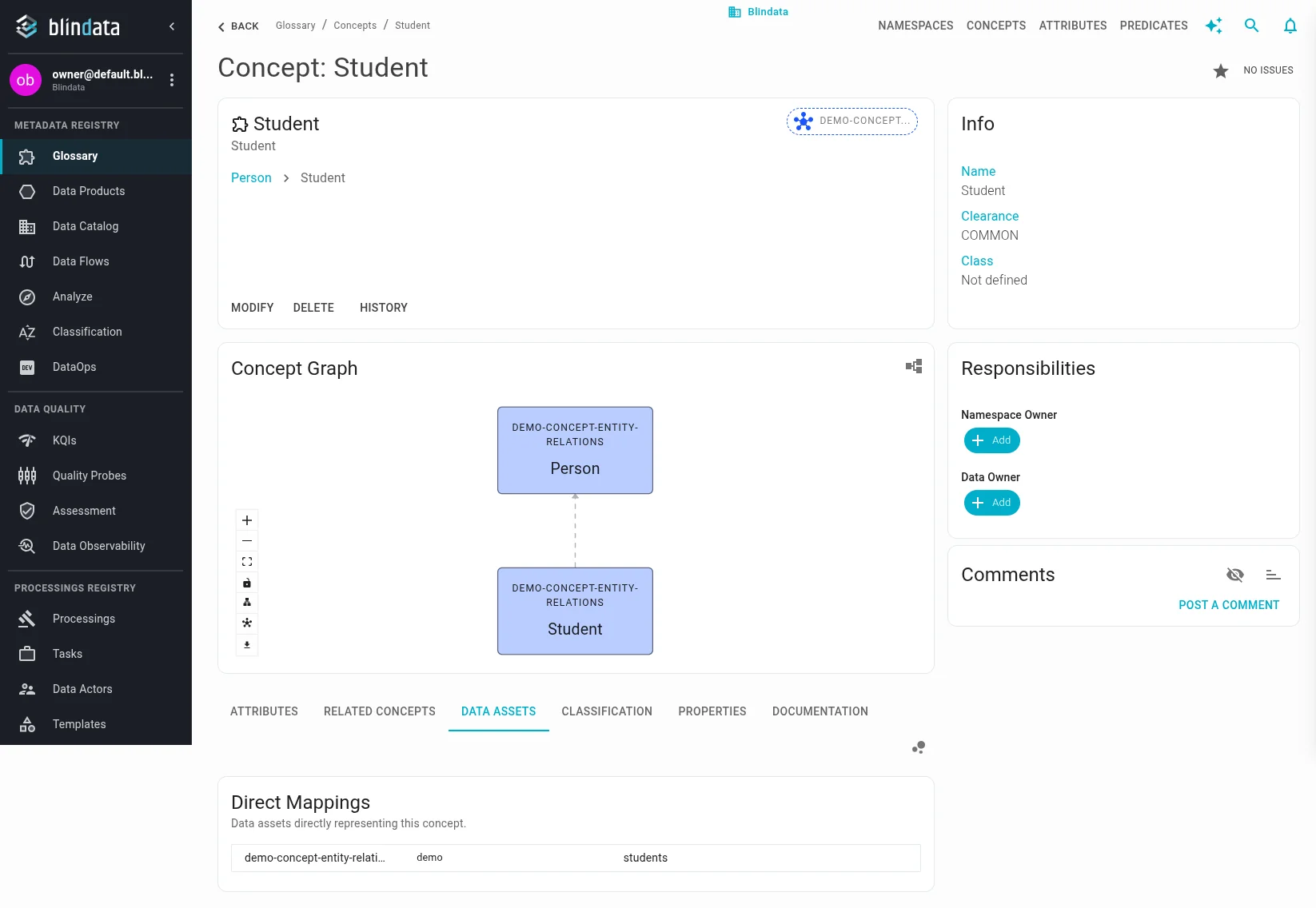
Student is a sibling of Actor, not a parent or a child. It shows students directly. Actor and SuperStar tables stay off this page. In this scenario no column was described as a student’s property, so only Direct Mappings appears.
SuperStar is the most specific concept. It shows superstars directly under every data product that publishes it, and awards because that table’s email column names SuperStar. It does not list every actor table. Those remain on Actor and roll up to Person.
Related guides
- Linking Catalog Assets to Business Glossary — create the asset and column links this tab reads
- Namespaces, Concepts, Attributes and Predicates — define concepts, attributes, and inheritance
- Ontology Modeling Guidelines — decide when a more specific concept is warranted